Running a retail business involves several connected workflows, from processing sales and tracking inventory to managing online orders and keeping product information accurate. Retail software brings these activities into a central system, helping retailers manage day-to-day operations with less manual record keeping.
The right solution depends on the retailer’s sales channels, inventory structure, number of locations, existing systems, and need for customization. Some businesses can use an established platform, while others may require a tailored system to support specialized workflows.
What Retail Software Is Used for in a Retail Business
This software is used to manage the operational information behind a store or retail operation. Instead of maintaining separate records for products, sales, stock, and orders, retailers can connect these workflows through a common system.
Depending on the solution, it may manage:
- Product and SKU information
- Point-of-sale transactions
- Inventory quantities
- Customer and purchase records
- Online and in-store orders
- Returns and exchanges
- Pricing and discounts
- Sales and inventory reports
- Multiple retail locations
The main advantage is the connection between these processes. For example, when a product is sold through a supported checkout system, the transaction can update the corresponding inventory record. The exact workflow depends on the platform and its integrations.
Retail Software for POS, Checkout, and In-Store Sales
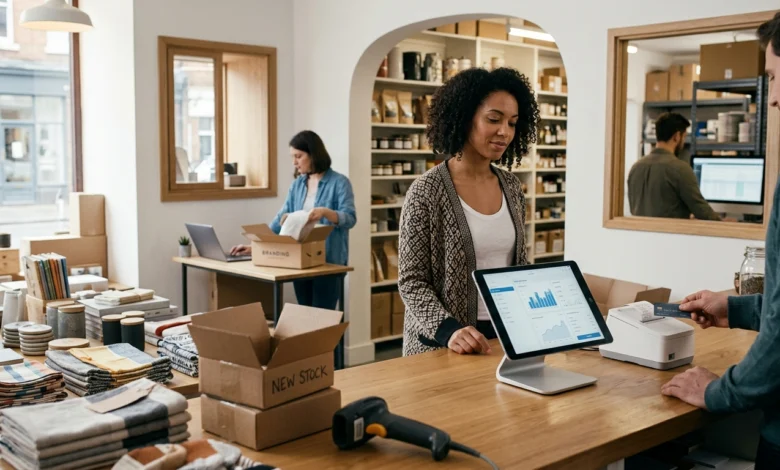
Point-of-sale functionality is central to many retail operations. A POS system records transactions while connecting products, prices, payments, and receipts.
A retail checkout workflow may include:
- Searching for a product
- Scanning a barcode or SKU
- Applying the current price
- Adding discounts or promotions
- Processing a payment
- Issuing a receipt
- Recording the completed transaction
- Updating inventory
Returns and exchanges can also be connected to transaction records when the platform supports these workflows.
For retailers with multiple registers or locations, centralized transaction records can make it easier to review sales activity and maintain consistent product information.
The hardware involved can vary as well. Depending on the setup, a retail system may work with barcode scanners, receipt printers, cash drawers, payment terminals, and other POS equipment.
Retail Inventory Software for Stock and Product Management
Inventory management is one of the most important functions to evaluate when choosing a retail system. Retailers need to know what products they carry, how many units are available, where stock is located, and how inventory changes over time.
A suitable inventory workflow can cover:
- Product catalogs
- SKU records
- Stock quantities
- Stock receiving
- Inventory adjustments
- Stock transfers
- Low-stock monitoring
- Inventory history
When a sale is recorded, the corresponding stock quantity may be reduced automatically if the POS and inventory systems are connected.
Receiving new stock can also update available quantities. For businesses operating several locations, inventory records may need to show which store or warehouse holds particular products.
Accurate product and stock records are especially important when customers can purchase the same products through multiple sales channels.
Also Read: Tournament Software: Manage Brackets, Players, Matches, and Results
Retail Software for Online and In-Store Orders
Retailers that sell through both physical stores and ecommerce channels have additional data-management requirements. Product availability, orders, prices, and fulfillment information may need to move between different systems.
It can help connect workflows such as:
Product catalog → customer order → inventory update → fulfillment → order status → return
For example, an online purchase may reduce the available quantity of a product while creating an order that needs to be fulfilled. A return can then require both a transaction adjustment and an inventory update.
The exact capabilities depend on the integrations available. Before choosing a system, retailers should check whether it connects with their existing ecommerce platform, payment provider, inventory system, and fulfillment workflow.
When a Retailer Needs Custom Retail Software Development
Custom retail software development can make sense when standard software cannot adequately support the way a retailer operates.
A custom solution may be considered when a business has:
- Specialized inventory rules
- Unusual pricing or ordering workflows
- Multiple systems that need custom integration
- Complex store or warehouse operations
- Specialized reporting requirements
- Existing software that cannot exchange required data
- Business processes that cannot be configured effectively in standard platforms
Custom development does not automatically make sense for every retailer. A small store with straightforward sales and inventory requirements may be better served by an established retail platform.
The decision should therefore start with the actual operational requirements. If standard software can handle the required workflow without costly workarounds, a ready-made solution may be more practical. If important processes cannot be supported without repeated manual work, a tailored system may provide a better fit.
What Retail Software Development Needs to Integrate
Retail software development often involves connecting several systems rather than creating an isolated application.
Depending on the business, a retail solution may need to exchange information with:
- POS systems
- Payment services
- Ecommerce platforms
- Inventory databases
- Accounting software
- Customer databases
- Shipping services
- Fulfillment systems
- Barcode scanners and other retail hardware
The purpose of an integration is to allow relevant information to move between systems without requiring employees to enter the same information repeatedly.
For example, an ecommerce order may need to reach the inventory and fulfillment systems, while the completed transaction may also need to appear in accounting records.
A development project should therefore define which systems need to communicate, what information must be exchanged, and which system should remain the primary source for each type of data.
How to Evaluate Before Choosing a Solution
The right retail platform depends on the business rather than the number of features listed by a vendor. Start by mapping the workflows that the software needs to support.
| Retail requirement | What to check |
|---|---|
| Sales | POS and transaction workflow |
| Inventory | Stock tracking and adjustment options |
| Products | SKU and catalog management |
| Orders | Online and in-store order handling |
| Returns | Refund and exchange workflow |
| Integrations | Compatibility with existing systems |
| Locations | Single-store or multi-store support |
| Reporting | Required sales and inventory reports |
| Customization | Configuration and development options |
| Growth | Capacity for additional products, orders, or locations |
A retailer with one physical store may have different requirements from a business operating several stores alongside an ecommerce website.
It is also important to check how the software handles data exports, user permissions, backups, updates, hardware compatibility, and integrations before moving existing retail records into a new system.
FAQs
What is retail software used for?
This is used to manage retail operations such as sales, POS transactions, inventory, products, orders, returns, customer records, and reporting. The exact functions depend on the software and its available integrations.
What is the difference between retail software and POS software?
POS software primarily handles sales transactions and checkout. It can cover a broader set of operations, including inventory, products, orders, customer records, reporting, and integrations with other business systems. Some platforms combine both functions.
When should a retailer consider custom development?
A retailer may consider custom development when its workflows, integrations, inventory rules, reporting requirements, or operational processes cannot be handled effectively by standard software.
Conclusion
The right retail software should match the way a business actually sells, stocks, fulfills, and manages products. Standard platforms can cover common POS, inventory, and order workflows, while custom retail software development becomes worth considering when specialized processes or integrations require a more tailored solution.