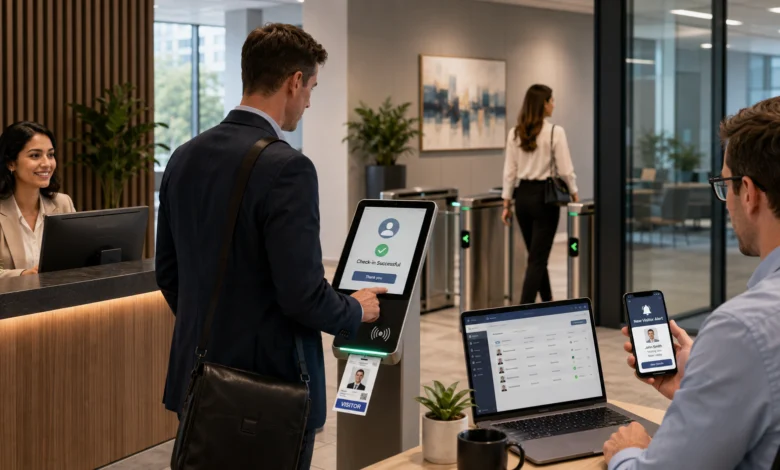
Visitor management software replaces a paper sign-in sheet with a controlled digital process for registering, screening, approving, checking in, and checking out guests. A typical system can record visitor details, notify the host, print or issue a badge, collect signatures, maintain a time-stamped visitor log, and connect with access-control tools.
The right platform should match the organization’s actual entry rules rather than simply digitize the reception desk.
The buying decision becomes more complex when a business has several locations, different visitor types, regulated areas, school campuses, or limited parking. In those cases, the software must manage permissions, data retention, emergency records, and integrations without making check-in slow or confusing.
Table of Contents
How Visitor Management Software Handles a Visit
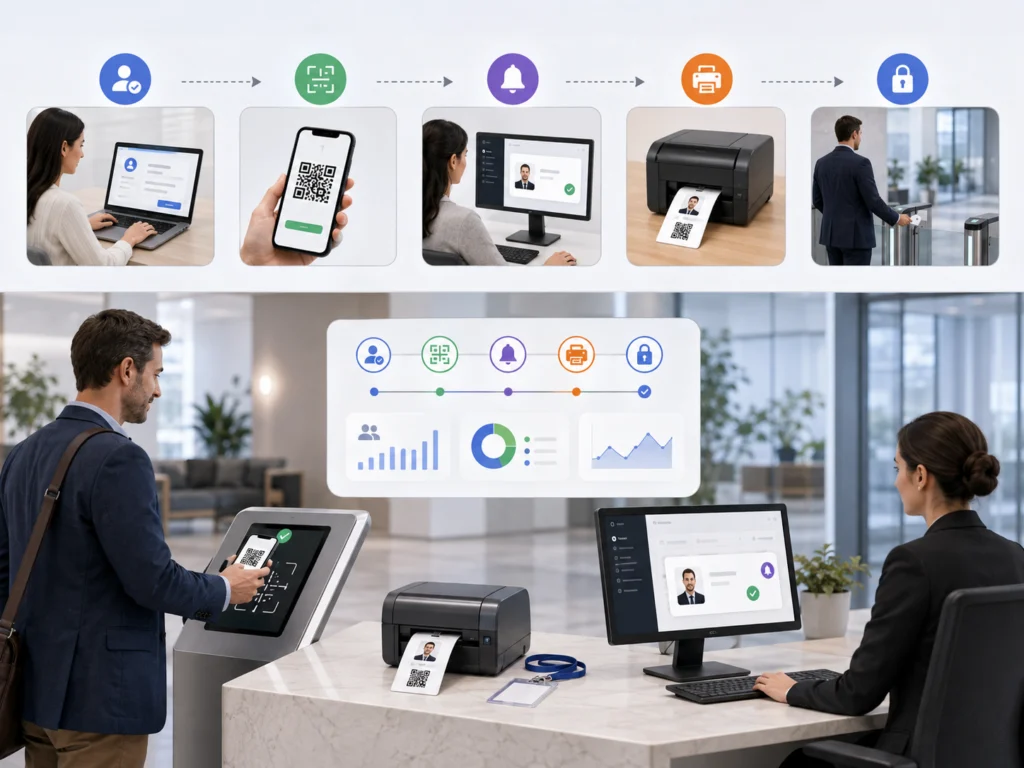
A visitor management workflow normally starts before the guest reaches the building. The host or reception team creates an invitation containing the visitor’s name, expected arrival time, destination, and host details. The system may then send directions, parking instructions, a QR code, required forms, or a reminder.
At arrival, the guest checks in through a tablet kiosk, reception computer, mobile link, QR code, or assisted desk process. The system verifies the invitation or collects required details, applies the correct visitor policy, alerts the host, and issues a badge or temporary credential when needed.
Modern platforms can also keep searchable and exportable logs for audits and incident reviews.
A complete visit flow may include:
- Pre-registration by an employee, resident, teacher, or administrator
- Confirmation email or text message
- Identity or invitation verification
- Agreement signing, such as an NDA, waiver, or safety notice
- Host approval or automatic approval based on policy
- Badge, QR code, keycard, or mobile credential issuance
- Arrival and departure time recording
- Credential expiration and visitor checkout
- Record retention, reporting, or deletion based on policy
The process should be different for a delivery driver, interview candidate, contractor, parent, vendor, and event attendee. Configurable sign-in flows allow an organization to collect only the information needed for each visitor category instead of forcing every guest through the same form.
Visitor Management System Software Features That Matter Most
The best feature list is the one that supports the site’s real access rules.
A small office may need pre-registration, host alerts, and badge printing. A factory, laboratory, data center, school, or multi-tenant property may need stronger approval controls, document checks, access restrictions, and detailed audit logs.
| Capability | What it should accomplish | What to verify during a demo |
|---|---|---|
| Pre-registration | Create an expected visitor record before arrival | Bulk invitations, recurring guests, calendar integration, cancellation |
| Configurable check-in | Show different forms and rules by visitor type | Required fields, conditional questions, multilingual options |
| Host notifications | Alert the correct employee when a guest arrives | Email, SMS, mobile app, Slack, Microsoft Teams, escalation |
| Badge management | Identify the visitor and limit confusion onsite | Badge templates, photographs, expiration times, printer compatibility |
| Document signing | Collect NDAs, waivers, policies, or safety acknowledgments | Version control, signature records, document retrieval |
| Approval rules | Route sensitive visits to the correct reviewer | Manual approval, deny lists, location-based policies |
| Access-control integration | Grant temporary physical access after approval | Credential activation, door permissions, automatic expiration |
| Visitor logs | Provide reliable arrival, departure, host, and location records | Search, filters, exports, timestamps, audit history |
| Emergency visibility | Show who may still be onsite | Live occupancy list, roll call, evacuation export |
| Data controls | Limit collection, access, retention, and deletion | Role permissions, retention rules, consent, regional storage |
| Multi-location administration | Apply central rules while allowing local differences | Templates, site-level settings, consolidated reporting |
| API and integrations | Exchange data with the existing workplace stack | SSO, SCIM, calendars, directories, webhooks, access control |
A polished kiosk is not enough.
Buyers should test what happens when the internet is unavailable, a badge printer stops working, the host does not respond, the visitor has no smartphone, or the invitation contains incorrect information. These failure cases often determine whether the system works at a busy entrance.
Also Read: Retail Software: Solutions for Sales, Inventory, POS, and Store Operations
Cloud, On-Premises, and Hybrid Deployment
Most current products are delivered as cloud services, but deployment should be chosen according to security, connectivity, integration, and data-location requirements.
A cloud platform is usually easier to deploy across several sites and can centralize updates, visitor policies, and reporting. It may also support remote administration and faster integration with calendars, identity providers, and workplace tools.
The buyer still needs to confirm:
- Data residency
- Backup procedures
- Uptime commitments
- Incident-response processes
- Data export options
- Service termination procedures
An on-premises system gives the organization more direct control over infrastructure and local data storage. However, it also shifts responsibility for servers, patches, backups, availability, and security monitoring to the internal team.
This deployment model may suit a site with strict network separation or limited external connectivity.
A hybrid setup may keep selected access-control or identity functions on local infrastructure while using a hosted visitor portal for invitations and administration.
The important question is not which model sounds more secure. It is whether responsibilities are clearly defined and whether the organization can operate, patch, monitor, and recover the system properly.
Security, Privacy, and Visitor Data Retention
Visitor records can contain:
- Names
- Contact details
- Photographs
- Signatures
- Identification information
- Host names
- Visit purposes
- Vehicle details
- Arrival and departure times
The system should therefore be reviewed as both a physical-security tool and a data-handling platform.
A practical security review should cover:
- Encryption during transmission and storage
- Administrator multi-factor authentication
- SSO support and role-based permissions
- Separate permissions for reception, security, site administrators, and auditors
- Configurable data-retention and deletion rules
- Audit logs for administrative changes and record access
- Secure kiosk mode that blocks access to device settings and other applications
- Automatic expiration of badges and temporary access credentials
- Vendor security testing, patching, backup, and incident-notification procedures
- Controlled exports so visitor data is not copied into unmanaged spreadsheets
Past security research found that poorly protected sign-in kiosks could expose visitor records or allow unauthorized control of the underlying device.
Although the specific products discussed in that research were addressed differently by their vendors, the broader lesson remains useful: a reception kiosk should be treated as an exposed endpoint, not as a decorative tablet.
Retention settings also deserve attention.
Keeping every visitor record forever increases risk and may conflict with the organization’s privacy obligations. The business should define why each field is collected, who can view it, how long it is required, and when it will be deleted.
Platforms increasingly provide consent, access-control, retention, and audit-log settings, but the customer must configure those controls correctly.
School Visitor Management Software Requirements
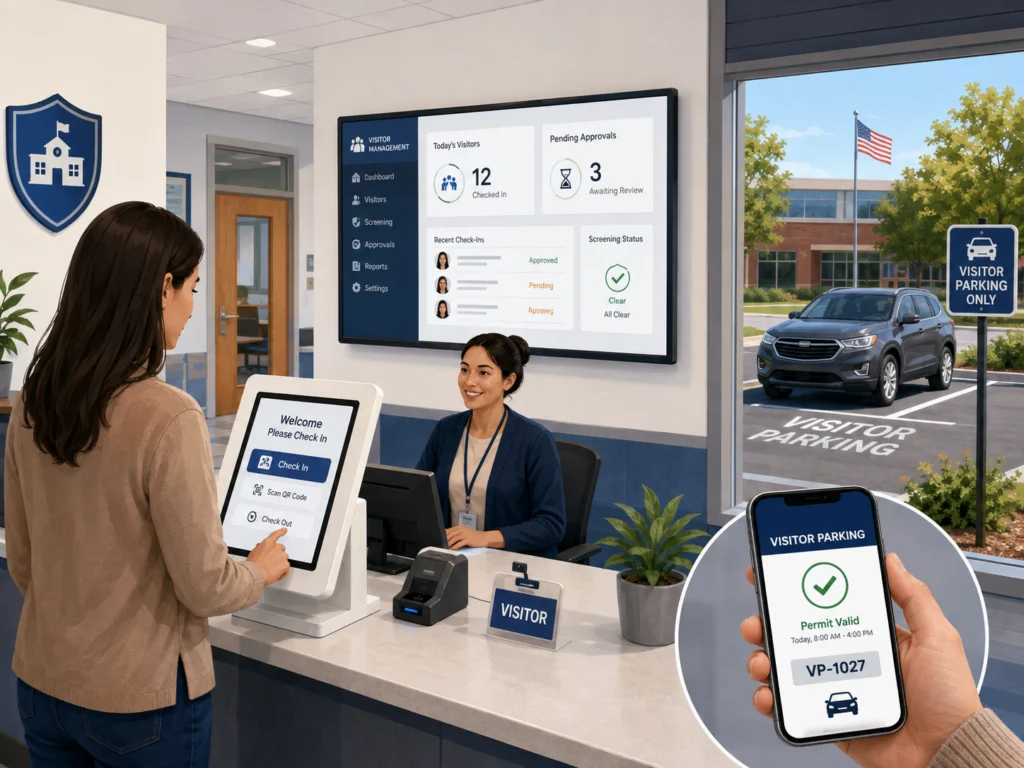
School visitor management software must support a controlled front-office process without creating unnecessary delays for parents, guardians, volunteers, contractors, substitutes, and emergency responders.
A school workflow may require:
- Government-issued ID scanning
- Invitation verification
- Guardian or staff confirmation
- Custom deny lists
- Badge printing
- Visit-purpose selection
- Alerts to designated personnel
Some school-focused systems also offer checks against public criminal or sex-offender registries.
Those checks should never operate as an unexplained automatic decision. The school needs a documented review process for possible matches, false positives, exceptions, and escalation.
Important school-specific capabilities include:
- Separate workflows for parents, volunteers, vendors, contractors, and district staff
- Fast check-in for approved recurring visitors
- Immediate alerts for denied or flagged entries
- Student pickup and reunification support where required
- Badge expiration and visible destination details
- Campus-level and district-level administration
- Emergency lists showing checked-in visitors by building
- Integration with doors, cameras, and staff directories where appropriate
- Minimal collection of personal data
- Clear procedures for visitors who cannot provide the expected document
Before purchase, the district should run the software through ordinary arrival periods, large events, late pickups, substitute-teacher check-in, and emergency drills.
A system that works during a sales demonstration may still fail when several visitors arrive at once or staff members are handling other front-office duties.
Visitor Parking Management Software and Building Access
Visitor parking management software handles the vehicle side of a visit.
It can allow a host, resident, tenant, or administrator to:
- Reserve a parking space
- Register a license plate
- Issue a digital permit
- Set an approved parking window
- Send directions before arrival
- Monitor active visitor permits
Some systems connect permits with license plate recognition, gate access, payment, or enforcement records.
Parking should not be managed as an isolated form when the same guest also needs building access. A stronger workflow connects the person, vehicle, host, location, permitted time, and access status in one record or through a reliable integration.
For example:
- The host registers the visitor and vehicle.
- The system assigns an available visitor space or parking zone.
- The guest receives a permit, QR code, plate confirmation, and directions.
- The parking record activates only for the approved date and time.
- Building check-in confirms the guest’s identity and host.
- Both parking and access permissions expire after checkout or the approved window.
Organizations should test:
- Duplicate license plate entries
- Rental cars
- Rideshare drop-offs
- Overnight guests
- Accessible parking spaces
- Full parking lots
- Permit extensions
- Enforcement disputes
The software should also prevent a visitor permit from becoming a permanent workaround for tenant or employee parking rules.
How to Compare Visitor Management Software Before Buying
Start with the workflow, not the vendor list.
Document each visitor category, entry point, approval rule, required field, badge type, access area, exception, and retention period. Then score products against those requirements.
1. Map Current Entry Processes
Observe how reception, security, employees, and visitors handle arrivals today.
Record:
- Visitor wait times
- Repeated data entry
- Missing or incomplete logs
- Badge-printing problems
- Delayed host responses
- After-hours procedures
- Manual exceptions
This creates a baseline against which the new system can be measured.
2. Define Required Integrations
List the exact systems that must connect, such as:
- Microsoft 365
- Google Workspace
- Okta
- Microsoft Entra ID
- Slack
- Microsoft Teams
- Access-control platforms
- Badge printers
- Employee directories
- Parking platforms
Ask the vendor to demonstrate the specific integration rather than simply confirming that an integration exists.
Check what data moves between the systems, how frequently it synchronizes, what happens when the connection fails, and whether additional fees apply.
3. Test Each Visitor Type
Create realistic test cases for:
- Contractors
- Interview candidates
- Delivery drivers
- Event guests
- VIPs
- Recurring vendors
- Parents
- Unannounced visitors
Confirm that each person sees the correct fields, documents, approval path, badge, parking instructions, and checkout process.
4. Review Administrative Controls
Check who can:
- Change sign-in fields
- Search visitor records
- Export data
- View identification details
- Create deny-list entries
- Change approval rules
- Edit retention settings
- Add or remove administrators
The platform should support limited roles rather than requiring every administrator to have full access.
5. Calculate the Full Cost
Pricing may depend on:
- Number of locations
- Number of kiosks
- Administrator accounts
- Monthly check-in volume
- Text-message notifications
- Badge printing
- Integrations
- Support level
- Access-control modules
- Parking functions
Include the cost of tablets, stands, printers, labels, network work, training, replacement devices, and implementation services.
A low subscription price can become expensive when essential integrations, hardware, or support are added separately.
6. Run a Pilot at a Difficult Location
Choose a location with meaningful traffic, several visitor types, or a known operational problem.
Measure:
- Check-in completion time
- Failed check-ins
- Host response time
- Reception workload
- Badge errors
- Visitor feedback
- Manual corrections
- Missed checkouts
A realistic pilot provides better evidence than a controlled vendor demonstration.
Visitor Management Software Market: What Buyers Should Know
Published estimates for the visitor management software market vary because research firms use different definitions, geographic coverage, base years, and product boundaries.
Some reports include software, hardware, and services under one visitor management system category. Others focus more narrowly on the software layer.
For 2026, published estimates are not identical:
- Fortune Business Insights projects a global visitor management system market of approximately $2.45 billion
- Mordor Intelligence estimates approximately $2.39 billion
- Future Market Insights estimates approximately $1.8 billion
Their longer-term forecasts also use different time periods and assumptions. These figures should therefore be treated as directional indicators rather than interchangeable facts.
The more useful buying signal is the product direction visible across current platforms, including:
- Cloud administration
- Mobile and QR-based arrival
- Deeper access-control connections
- Configurable sign-in flows
- Temporary digital credentials
- Centralized multi-site reporting
- School-specific screening
- Connected parking functions
- Combined workplace management tools
Market growth does not prove that a particular platform is suitable.
Buyers should give more weight to security controls, workflow fit, integration quality, support, data portability, and measurable performance during a pilot.
Implementation Checklist for a Reliable Rollout
A successful visitor management software rollout needs more than installing a tablet at reception.
Use this sequence:
- Assign owners from facilities, security, IT, privacy, and front-desk operations.
- Define visitor categories and the minimum data required for each one.
- Configure invitation, approval, check-in, badge, and checkout rules.
- Connect identity, calendar, communication, access-control, and parking systems.
- Set administrator roles and data-retention periods.
- Lock down kiosk devices and test software recovery.
- Create fallback procedures for outages, printer failures, and unannounced visitors.
- Train reception, security, hosts, and local administrators.
- Pilot the process with real visitor scenarios.
- Review logs, delays, exceptions, and user feedback after launch.
Useful rollout measurements include:
- Average check-in time
- Percentage of pre-registered guests
- Host-notification response time
- Number of incomplete checkouts
- Failed badge prints
- Denied-entry escalations
- Manual record corrections
- Visitor support requests
These measures show whether the system is reducing friction without weakening access rules.
FAQs
What is the difference between a visitor management system and access control?
A visitor management system handles invitations, registration, screening, approvals, badges, notifications, and visitor records.
Access control decides whether a credential can unlock a door, gate, elevator, or restricted area. The two systems can work together, but they perform different functions.
Can visitor management software replace a receptionist?
It can automate routine tasks, but it does not replace every reception or security decision.
Staff may still need to confirm identity, resolve invitation errors, review alerts, assist visitors, handle deliveries, and respond to unusual situations.
Does every visitor need to scan an ID?
No.
The requirement should depend on the organization’s policy, risk level, visitor type, and applicable privacy rules. A low-risk meeting guest may need only an invitation confirmation, while a school, laboratory, or restricted facility may require stronger verification.
Can the software work without a kiosk?
Yes.
Many systems support reception-assisted check-in, mobile links, QR codes, web forms, or host-managed registration. A kiosk is one possible interface, not the entire system.
What should be included on a visitor badge?
A badge may include:
- Visitor name
- Photograph
- Company
- Host
- Destination
- Visitor type
- Issue time
- Expiration time
The organization should avoid printing unnecessary personal information.
How long should visitor records be stored?
There is no single retention period that applies to every organization.
The period should be based on a documented business, safety, contractual, or legal need. Records should not be kept indefinitely by default.
Can one platform manage visitors and visitor parking?
Some platforms include both functions, while others connect through an integration.
The key requirement is that the guest’s vehicle permission, building access, host, location, and approved time remain synchronized.
Conclusion
Visitor management software should create a controlled and traceable path from invitation to departure.
The best choice is not the platform with the longest feature list. It is the one that fits the organization’s visitor types, access rules, privacy requirements, parking process, integrations, and emergency procedures and proves that fit during a realistic pilot.