Custom software development is the process of designing and building an application around the specific requirements of a business or group of users.
Unlike ready made software that offers the same features to every customer, custom software is created for a defined workflow, system, service, or operational problem. It may replace spreadsheets, connect existing platforms, support a new digital product, or manage a process that standard applications cannot handle properly.
A successful project requires more than writing code. It begins with understanding the business problem and continues through planning, design, development, testing, launch, maintenance, and future improvement.
This guide explains what custom software development services include, when a tailored system is appropriate, what affects cost and timeline, and how to select a suitable development partner.
Table of Contents
What Custom Software Development Means
Custom software development creates an application for a particular organization, workflow, customer group, or product idea.
The finished system may be used by employees, customers, vendors, administrators, field workers, patients, members, or business partners. Its features and permissions are based on what those users need to accomplish.
Examples include an internal order management system, a customer portal, an appointment platform, a custom CRM, a reporting dashboard, a subscription product, or a mobile application for field employees.
The main difference between custom and ready made software is control. A ready made product follows the vendor’s feature set and update schedule. A custom application can be shaped around the organization’s requirements, data, integrations, rules, and growth plans.
However, greater control also brings responsibility. The owner must plan development, testing, security, hosting, support, and future updates.
When a Business Needs Custom Software
Custom development is most useful when an important process cannot be handled properly by an existing product.
A business may consider it when employees repeatedly move data between spreadsheets, email, forms, and disconnected platforms. It may also be appropriate when an existing subscription requires expensive workarounds or does not support a critical workflow.
Common reasons include:
- The business has a unique operating process
- Existing products require too much manual work
- Several systems need to exchange information
- Customers need a dedicated portal or application
- The company wants to launch a software product
- Current software cannot support expected growth
- An old application has become difficult to maintain
- Security or access requirements are not being met
Custom software should solve a measurable problem. Building a tailored application simply because it appears more professional can create unnecessary cost and maintenance.
Types of Custom Software Solutions
Custom software solutions can support internal operations, customer services, data management, communication, reporting, and digital products.
| Software type | Main purpose | Common users |
|---|---|---|
| Internal business application | Manages a company process | Employees and managers |
| Customer portal | Gives customers access to accounts and services | Customers and support teams |
| Web application | Delivers functions through a browser | Internal or external users |
| Mobile application | Supports work through phones and tablets | Customers and mobile teams |
| SaaS platform | Provides subscription based software | Paying subscribers |
| Workflow system | Moves tasks through defined stages | Operations teams |
| Reporting dashboard | Presents business data and performance | Managers and executives |
| Integration platform | Connects separate applications | Operations and technical teams |
| Legacy replacement | Replaces an outdated system | Existing employees and customers |
| Industry specific platform | Supports specialized requirements | Healthcare, finance, logistics, and other sectors |
The correct application type depends on how people will access it and what the system must accomplish.
A browser based application may suit employees working across several locations. A mobile application may be necessary when users work away from a desk. A connected internal tool may be enough when the main problem involves data entry and approvals.
Businesses planning internal workflow systems can review the custom business software guide for examples covering CRM, inventory, scheduling, portals, and reporting.
What Custom Software Development Services Include
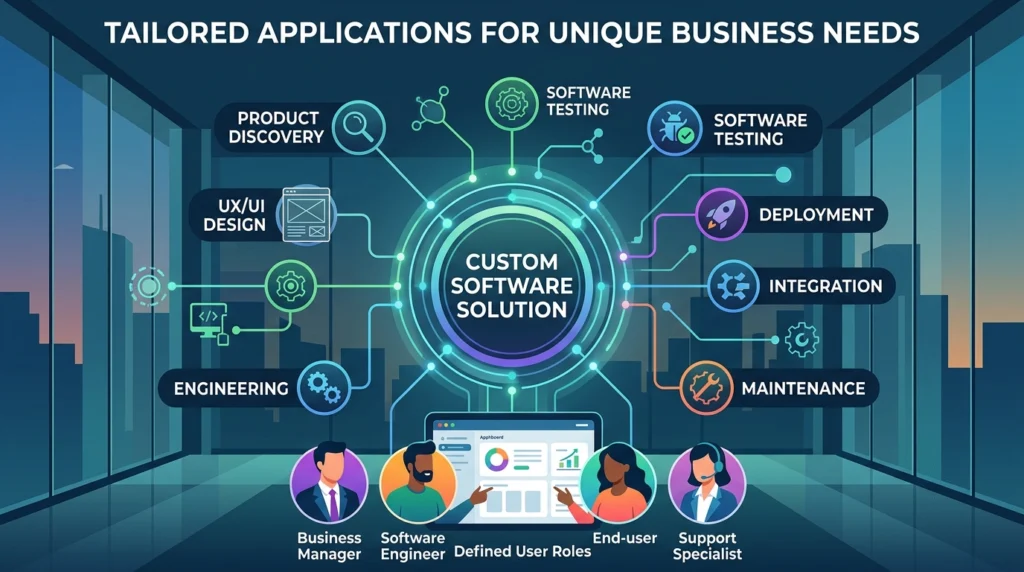
A complete custom software development service normally covers planning, design, engineering, testing, deployment, and support.
Some providers offer the entire process. Others specialize in a particular stage such as design, mobile development, software testing, or legacy modernization.
Product Discovery and Requirements
The first stage identifies the business problem and the people who will use the application.
The discovery process should answer questions such as:
What does the current workflow look like?
Where do delays or errors occur?
Which users will access the system?
What information must the software store?
Which existing platforms must connect with it?
What reports are required?
Which features are necessary for the first release?
The output may include a requirements document, workflow map, feature list, user roles, project scope, risk assessment, and release plan.
Weak requirements create expensive changes later. The project team should therefore confirm the problem before deciding how the software will work.
User Experience and Interface Design
The design stage determines how users will move through the application.
Designers may prepare user flows, wireframes, clickable prototypes, screen layouts, and reusable interface components.
A prototype allows stakeholders to review the proposed experience before full development begins. This can reveal confusing navigation, missing actions, or unnecessary steps while changes are still relatively easy.
Good design is not limited to colors and visual appearance. It should make frequent tasks simple, protect users from mistakes, and present important information clearly.
Software Architecture and Technical Planning
Software architecture defines how the application will be structured.
The development team considers data storage, user authentication, integrations, hosting, permissions, performance, backups, and future expansion.
Technical decisions should reflect the real project instead of following trends. A small internal system may not need the same infrastructure as a platform serving thousands of customers.
The team should also decide how development, testing, and production environments will remain separate.
Development
During development, engineers create the application and connect its components.
Work is often divided into short delivery cycles. Each cycle may include a defined group of features that can be reviewed and tested.
Regular demonstrations help stakeholders see progress and identify misunderstandings before too much work has been completed.
The development process should include clear code standards, version control, reviews, documentation, and a method for tracking defects.
Software Testing
Testing confirms whether the application works as expected.
It may include functional testing, integration testing, usability testing, performance testing, security testing, and checks across supported browsers and devices.
Testing should cover ordinary actions and failure cases.
For example, the team should check what happens when an integration is unavailable, a user enters invalid information, a payment fails, a file is too large, or an unauthorized person attempts to access restricted data.
Deployment and Launch
Deployment moves the approved application into its live environment.
Before launch, the team should confirm hosting, domains, certificates, backups, monitoring, user accounts, integrations, and data migration.
A launch plan should explain who will respond if an important function fails. High risk projects may use a phased release instead of moving every user at once.
Maintenance and Support
Custom software continues to require attention after launch.
Maintenance may include defect correction, security updates, performance improvements, compatibility changes, user support, backups, monitoring, and new features.
The support agreement should define response times, responsibilities, working hours, update procedures, and ownership of technical accounts.
Custom Software Versus Ready Made Software
The choice is not always between a poor standard product and a perfect custom application.
Ready made software can be faster to introduce and may already include updates, support, documentation, and common integrations. It can be the better option when the business process is standard and does not provide a competitive advantage.
Custom software may be more appropriate when the workflow is unique or when existing products create serious limitations.
| Decision factor | Ready made software | Custom software |
|---|---|---|
| Initial setup | Usually faster | Requires planning and development |
| Feature control | Limited to vendor options | Built around defined requirements |
| Ownership | Vendor controls the product | Depends on the development agreement |
| Integrations | Limited to supported connections | Can be developed for required systems |
| Maintenance | Managed mainly by vendor | Owner and development partner share responsibility |
| Scalability | Depends on the product plan | Can be designed for expected growth |
| Cost structure | Subscription or license | Development plus ongoing operation |
| Competitive value | Same product available to others | Can support a unique process or service |
A company should also consider a combined approach. Existing software can manage standard functions while a smaller custom application handles the unique workflow.
How the Development Process Works
A structured process reduces uncertainty and helps the team make decisions before they become costly.
Step 1: Define the Problem
Describe the business issue without immediately deciding on features.
For example, the real problem may be delayed order approval rather than the absence of a mobile application.
Step 2: Map the Current Workflow
Document how work moves between people, departments, documents, and systems.
This exposes repeated entry, unclear ownership, missing information, and unnecessary approval stages.
Step 3: Define the First Release
Separate required features from useful future additions.
The first release should solve the central problem without trying to include every possible request.
Step 4: Create and Test a Prototype
A clickable prototype helps users review the proposed workflow before engineering begins.
Feedback at this stage can prevent expensive redevelopment.
Step 5: Develop in Reviewable Stages
The team builds the software in manageable sections and demonstrates progress regularly.
Stakeholders should review actual working functions rather than waiting until the end.
Step 6: Test the Full Workflow
Testing should follow realistic user scenarios from beginning to end.
Individual screens may work correctly while the complete process still contains gaps.
Step 7: Prepare Data and Users
Clean existing records before migration. Create user accounts and permissions. Train staff on the new process.
Step 8: Launch and Monitor
Monitor errors, speed, user behavior, failed integrations, and support requests.
The first release should be followed by a planned review period.
How Much Custom Software Development Costs
There is no single price for custom software development because project requirements vary widely.
Cost is affected by the number of screens, user roles, workflows, integrations, platforms, security controls, reports, and expected users.
A simple internal tool costs less than a customer platform with mobile applications, payments, several integrations, and complex access controls.
Important cost factors include:
The clarity of the requirements
The size and experience of the team
The number of application platforms
The complexity of the interface
The amount of data migration
The number of external integrations
Security and compliance requirements
Testing depth
Hosting and infrastructure
Maintenance and support
Frequent changes during development can also increase cost. This is why discovery and prototyping are important.
Fixed Price Versus Time Based Development
A fixed price agreement provides an agreed cost for a clearly defined scope.
It may suit a project with stable requirements and limited uncertainty. Changes outside the agreed scope normally require a separate estimate.
A time based agreement charges for the actual work completed by the team. It provides more flexibility when the product will evolve through feedback and testing.
Neither model automatically protects the buyer from poor delivery.
A fixed price project can fail when important requirements were excluded. A flexible model can become expensive when priorities and budgets are not controlled.
The agreement should explain scope, payment stages, change requests, acceptance criteria, and reporting.
How Long Development Takes
The timeline depends on project size, decision speed, integrations, testing, and the availability of business stakeholders.
A small internal application may be completed much sooner than a multi platform product with several user groups.
Projects are often delayed by issues outside coding.
Common causes include incomplete requirements, slow approvals, unavailable sample data, changes in priorities, delayed integration access, and unclear responsibility.
A realistic plan should include discovery, design, development, testing, migration, training, deployment, and a buffer for corrections.
Source Code and Software Ownership
Ownership should be discussed before the project begins.
The contract should explain who owns:
The source code
Design files
Databases
Documentation
Cloud accounts
Domains
Third party accounts
Custom components
Deployment scripts
Some providers retain ownership and license the software to the customer. Others transfer ownership after payment.
The customer should also understand which open source packages and third party services are used. Full ownership of the custom code does not mean ownership of external libraries or subscription services.
A practical handover should include source code access, technical documentation, account credentials, deployment instructions, and database export procedures.
Security Requirements
Security should be included in planning rather than added shortly before launch.
The project may require secure authentication, role based access, encryption, activity logs, backups, vulnerability management, and recovery procedures.
Sensitive functions should receive additional review.
Examples include payments, healthcare records, employee information, customer identity data, financial transactions, and administrator permissions.
Organizations handling clinical information should use the dedicated custom healthcare software development guide to review healthcare workflows, access control, interoperability, and patient data requirements.
Financial platforms have separate transaction and identity risks. Those projects are covered in the custom fintech software development guide.
Integrations and Data Migration
Custom applications rarely operate alone.
They may need to connect with accounting software, payment gateways, customer databases, email platforms, identity services, inventory systems, analytics tools, or existing internal applications.
Each integration should define which information moves, which system owns the original record, how often data updates, and what happens when the connection fails.
Data migration also requires planning.
Old records may contain duplicates, incomplete fields, outdated categories, or inconsistent formats. Importing them without review moves existing problems into the new application.
The migration plan should identify what data will be transferred, how it will be cleaned, how records will be matched, and how the final totals will be verified.
Custom Enterprise Software Development
Large organizations usually require more than a larger version of a small business application.
Enterprise systems may need to support several departments, locations, legal entities, permission levels, large data volumes, and existing platforms.
They may also require single sign on, detailed audit records, business continuity planning, staged migration, and formal support agreements.
The custom enterprise software development guide explains these requirements without repeating the general development process covered on this page.
How to Choose a Custom Software Development Company
A suitable custom software development company should understand the business problem and explain how it will manage delivery risk.
Do not select a provider only because its website lists many technologies.
Review relevant project experience, communication, process, security practices, testing, ownership terms, and support arrangements.
Ask the provider to explain:
How requirements will be documented
Who will manage the project
Who will write and review the code
How progress will be demonstrated
How changes will affect cost
How testing will be completed
Who will own the source code
How the application will be deployed
What support is included after launch
How data can be exported if the relationship ends
A custom software development agency may offer design, engineering, testing, and project management under one agreement. An independent custom software developer may be suitable for a smaller and clearly defined project.
The right choice depends on project complexity and the level of support required.
Readers comparing providers can use the best custom software development companies guide to review company selection criteria and suitable provider types.
Warning Signs When Selecting a Provider
A low estimate is not always a good estimate.
A proposal may be incomplete if it does not mention requirements, testing, deployment, migration, documentation, and support.
Other warning signs include unclear ownership, no named delivery process, limited access to the working product, no change procedure, and dependence on one person without a backup plan.
The provider should be able to explain both what is included and what is excluded.
Common Custom Software Project Mistakes
One common mistake is beginning development before the team agrees on the actual problem.
Another is trying to include every requested feature in the first release.
Businesses also create risk when they delay testing, ignore data quality, provide feedback too slowly, or fail to assign an internal project owner.
The application may be technically correct and still fail if employees do not understand the new workflow.
Training and process changes should be planned alongside software development.
Measuring Whether the Software Is Successful
Success should be connected to the original business problem.
Useful measurements may include shorter processing time, fewer manual corrections, improved completion rates, reduced support requests, faster reporting, increased customer self service, or lower dependence on spreadsheets.
Technical measurements are also important.
The team may track system availability, response speed, failed transactions, error rates, security events, and support volume.
Measurements should be selected before launch so the business can compare the new process with the previous one.
FAQs
What is custom software development?
It is the process of creating an application for the specific requirements of an organization, workflow, product, or user group.
What do custom software development services include?
They may include discovery, requirements, interface design, architecture, coding, integrations, testing, deployment, data migration, maintenance, and support.
Is custom software better than ready made software?
Not always. Ready made software can be more suitable for standard processes. Custom development is more useful when existing products cannot support an important requirement or unique workflow.
How do I choose a custom software development company?
Review relevant experience, process, communication, testing, security, ownership, support, and the ability to understand your business requirements.
Who owns custom software after development?
Ownership depends on the contract. The agreement should clearly cover source code, designs, documentation, accounts, databases, and custom components.
Does custom software need ongoing maintenance?
Yes. It may require security updates, defect correction, infrastructure management, compatibility changes, monitoring, support, and future improvements.
Can existing software be connected to a custom application?
Yes. A custom application can connect with existing systems when suitable APIs, files, or integration methods are available.
Should a business build the full system at once?
Usually not. A focused first release reduces risk and provides real user feedback before the business invests in additional features.
Conclusion
Custom software development can provide a strong solution when standard products cannot support an important workflow, integration, customer experience, or business model.
The project should begin with a clear problem and a realistic first release. Requirements, design, testing, security, ownership, migration, and maintenance must all be planned before launch.
A business should compare custom software development services by delivery quality and long term fit rather than price alone. The best partner is the one that understands the workflow, communicates clearly, protects the organization’s data, and builds a system that can be maintained after the first release.