Finding the best free drawing software doesn’t mean compromising on features or performance. Today’s free creative applications offer professional tools for digital painting, illustration, sketching, logo design, and graphic editing without requiring expensive subscriptions. Whether you’re a beginner learning digital art or an experienced designer working on commercial projects, there are reliable options that can support almost every type of creative workflow.
Instead of choosing a program simply because it’s popular, focus on what you want to create. Some applications are built for painting and concept art while others specialize in vector graphics or image editing. Understanding these differences makes it much easier to choose software that matches your projects hardware and experience level.
Table of Contents
Choose the Right Drawing Software for Your Creative Work
No single application is perfect for every artist. The right choice depends on the type of work you create. Illustrators usually need realistic brushes and pressure-sensitive tablet support, while graphic designers often prefer vector editing for logos, icons, and branding materials. Photo editors may look for software that combines drawing tools with advanced image manipulation.
Beginners should also pay attention to usability. A clean interface and well-organized workspace help new users learn digital art faster than applications filled with advanced tools that may never be used. Choosing software that matches your current skill level makes learning more enjoyable and allows you to build confidence before moving to more advanced features.
Best Options for Beginners
Learning digital art becomes much easier when the software is simple to understand. Applications with intuitive navigation, essential drawing tools, and customizable workspaces help new users focus on creativity instead of spending hours learning the interface.
Paint NET is a practical choice for Windows users because it is lightweight, responsive, and supports layers, plugins, and basic graphic editing. It works well on older computers while still providing enough functionality for everyday creative projects.
MediBang Paint is another beginner-friendly application especially for comic artists and illustrators. Built-in templates, cloud synchronization, and a collection of ready-made brushes make it easy to start drawing without extensive setup.
As skills improve, many artists move to Krita because it offers professional painting tools while allowing the workspace to be customized according to individual preferences. This makes it suitable for both learning and advanced illustration work.
Best Free Drawing Software for PC
Windows users have access to several reliable drawing applications that perform well across different hardware configurations. The best option depends on the type of artwork being created rather than the operating system itself.
Krita is well known for digital painting, thanks to its advanced brush engine, animation features, layer management, and excellent graphics tablet support. Artists creating concept art or detailed illustrations often choose it because it provides professional-level creative tools.
Paint.NET remains a solid option for users looking for fast performance and lower system requirements. It is particularly useful for graphic editing, simple illustrations, and everyday design work.
For vector graphics, Inkscape is one of the strongest free choices available. Designers use it to create logos, icons, diagrams, and scalable illustrations that maintain image quality regardless of size.
Before installing any application, compare its system requirements with your computer’s specifications. Larger canvases, multiple layers, and complex projects require more processing power, so selecting software that matches your hardware helps maintain a smooth creative workflow.
Free Drawing Apps That Stand Out for Creative Projects
Every free drawing application has its own strengths, so the best choice depends on the kind of work you create. Some programs are built for digital painting, while others focus on vector graphics, image editing, or comic creation. Understanding these differences helps you choose software that improves your workflow instead of slowing it down.
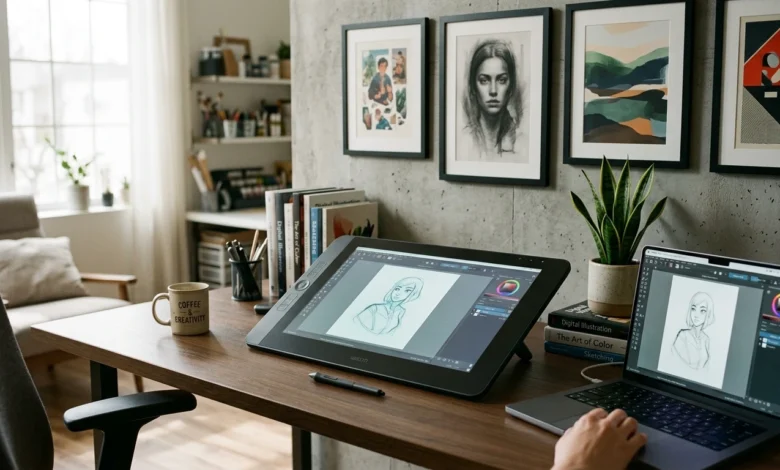
Krita is widely recognized for digital painting and concept art because of its powerful brush engine, customizable workspace, and excellent graphics tablet support. Artists working on illustrations, comics, or matte paintings often appreciate its natural drawing experience and extensive brush library.
If your projects involve logos, icons, or scalable graphics, Inkscape offers tools designed specifically for vector artwork. Since vector graphics can be resized without losing quality, they are commonly used for branding, print materials, websites, and user interface design.
For creators who regularly edit images alongside illustrations, GIMP provides a balanced combination of drawing and photo-editing capabilities. Layer management, selection tools, filters, and plugin support make it useful for producing website graphics, marketing visuals, and social media content from a single workspace.
How to Compare Drawing Software Before Downloading
Installing software without comparing its features often leads to unnecessary switching later. Instead of focusing on popularity, consider how well the application matches your creative needs.
The first factor to evaluate is your primary workflow. Digital painters benefit from advanced brush customization and pressure sensitivity, while graphic designers usually require vector editing and typography tools. If your work combines illustration with photo editing, software that supports both tasks can save considerable time.
Performance is another important consideration. Projects containing multiple layers, high-resolution canvases, and detailed brush effects require more system resources than basic sketches. Choosing an application that matches your computer’s specifications helps maintain smooth performance during long creative sessions.
File compatibility should also influence your decision. Support for formats such as PSD, SVG, PNG, JPG, and PDF makes it easier to collaborate with clients, printers, and other designers without converting files between multiple programs.
When designing interfaces or application graphics, understanding Software Testing Strategies can also help ensure visual elements remain consistent across different devices and screen sizes.
Mistakes to Avoid When Choosing Drawing Software
One of the biggest mistakes is assuming that software with the largest number of features is automatically the best option. In reality, many users only rely on a small percentage of available tools. Selecting software that matches your current skill level often produces better results than choosing the most complex application.
Ignoring hardware requirements is another common problem. Advanced painting software may perform slowly on older computers, especially when working with large canvases or dozens of layers. Checking recommended specifications before installation helps avoid performance issues.
Many beginners also change software too frequently. Learning shortcuts, workspace customization, brush settings, and layer management takes time. Mastering one application before exploring alternatives usually leads to faster improvement and a more efficient creative workflow.
Can Free Drawing Software Replace Premium Applications?
For most artists, designers, students, and freelancers, modern free drawing applications provide everything needed to produce professional-quality work. Digital illustrations, concept art, comics, website graphics, marketing materials, and logos can all be created using free software without sacrificing quality.
Premium creative suites still offer advantages for large organizations that require cloud collaboration, integrated workflows, or enterprise-level support. However, those additional services are not essential for every user. Many professionals successfully complete commercial projects using free applications because they provide reliable tools without ongoing subscription costs.
Businesses producing promotional graphics can also combine their designs with Email Marketing Software to create consistent visual branding across newsletters, campaigns, and customer communications.
FAQs
What is the best free drawing software?
The answer depends on your workflow. Krita is widely used for digital painting, Inkscape is ideal for vector graphics, while GIMP combines illustration with powerful image editing.
What is the best free drawing software for PC?
Windows users commonly choose Krita, Paint.NET, GIMP, and Inkscape because they offer reliable performance and support a wide range of creative projects.
Can beginners learn digital art with free software?
Yes. Many free applications provide beginner-friendly interfaces while still offering advanced features that become useful as your skills improve.
Do free drawing applications support graphics tablets?
Most leading applications support pressure-sensitive drawing tablets, allowing artists to create smoother lines and more natural brush strokes.
Can professionals use free drawing software for commercial work?
Yes. Freelancers, illustrators, and graphic designers regularly use free applications to create commercial artwork, marketing materials, branding assets, and digital illustrations.
Conclusion
Choosing the right drawing software depends on your creative goals rather than the price of the application. Whether you’re creating illustrations, designing logos, editing graphics, or learning digital art for the first time, today’s free tools offer professional features that meet the needs of both beginners and experienced creators. Comparing features, performance, hardware compatibility, and file support before downloading will help you select software that continues to support your projects as your skills and creative requirements grow.