
Sunday night lesson prep is a familiar ritual for most teachers, and it’s exactly the problem Chalkie AI was built to solve. Instead of stitching together slides, worksheets, and vocabulary lists from scratch, the platform turns a topic and a curriculum standard into a ready-to-teach lesson in under a minute. It has quickly become one of the more talked-about lesson planning platforms built specifically for classrooms, with reports suggesting it’s used by more than 500,000 teachers worldwide. This guide walks through what the tool actually does, how to log in and get started, what’s included in the free plan, and where it fits as chalkie ai for teachers looking to cut down on prep time without sacrificing quality.
Table of Contents
What Is Chalkie AI?
At its core, Chalkie AI is an education technology platform that generates classroom-ready materials — lesson slides, activity sheets, quizzes, and full lesson series aligned to curriculum standards in regions including the US, UK, and Australia.
A teacher types in a topic, such as “The Water Cycle” or “Character Development,” selects a year group or grade level, and chooses a curriculum framework to align to. From there, the platform produces a structured lesson complete with objectives, key vocabulary, images, and suggested activities, all in a format that can be edited, exported, or presented directly.
What sets it apart from many text-only planning tools is that it outputs a fully formatted, editable slideshow rather than a plain document that still needs to be turned into a presentation separately. It also supports lesson series of up to a dozen connected lessons, which makes it useful for planning entire units rather than one class at a time.
A newer addition lets teachers paste in a YouTube link and convert the video into a structured slide-based lesson, which is a nice shortcut for anyone building a lesson around existing video content.
Planning Lessons and Classroom Activities
The planning workflow is designed to feel less like operating software and more like describing what you want out loud. You tell the system what you’re teaching, and it fills in the structural pieces learning objectives, vocabulary, discussion questions, and formative checks that would otherwise take real time to assemble by hand.
Teachers can also build standalone activity sheets on the fly, generating starters, plenaries, or homework tasks that match the level and subject of a specific class.
For subjects with heavy vocabulary loads, like science or history, the platform tends to save the most time, since it can surface key terms and definitions automatically instead of requiring a separate search. Math and skills-based subjects benefit too, particularly when a teacher wants differentiated versions of the same worksheet for mixed-ability groups.
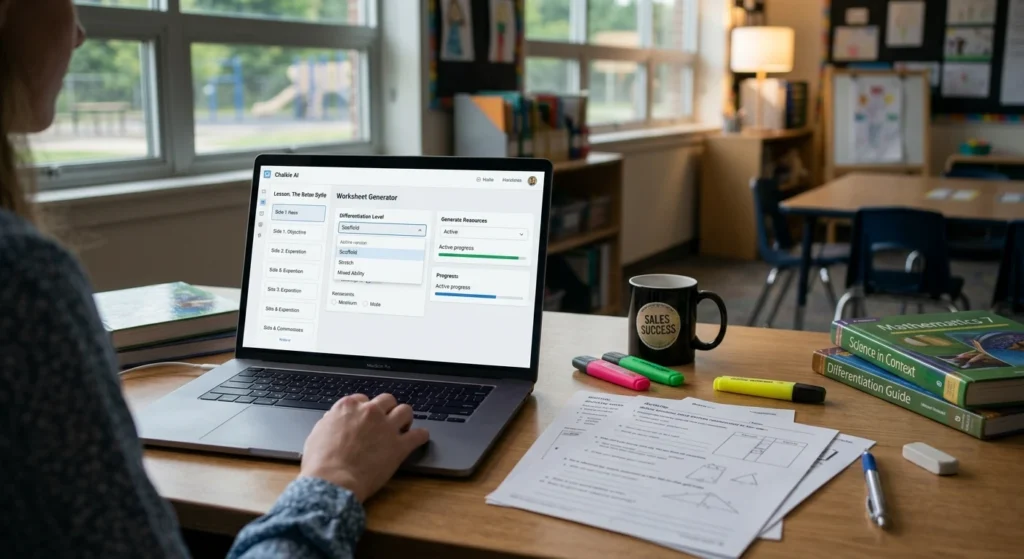
The output isn’t meant to be used unedited in every case some reviewers note that content occasionally needs light polishing for tone or local phrasing but it consistently gets a lesson from blank page to nearly finished draft far faster than manual planning.
One practical difference is that many lesson planning platforms generate plain text that still needs to be copied into presentation software before it can be used in class. Here, lessons are produced as editable slide decks, reducing the amount of formatting teachers usually have to complete before teaching.
Getting Started With Your Account
Signing up is the first step, and most new users start with the free trial rather than committing to a paid plan right away. Once an account exists, returning to the platform is straightforward: the chalkie ai login page asks for an email and password, or a single sign-on option through Google, and drops you into a dashboard where past lessons, activity sheets, and lesson series are stored and searchable.
If a password is forgotten, a standard reset link is sent to the registered email, which is worth noting since school email systems sometimes route these into spam folders.
For schools rolling the tool out across a department, it’s worth checking whether an admin has already set up a shared or bulk account structure before creating individual sign-ups, since some school-wide plans handle logins differently than the standard consumer flow.
Also Read: Seamless AI Lead Research Login Reviews and Alternatives
Free Access, Plans, and Usage Limits
New users get chalkie ai free access through a trial period that lets them test the lesson planner, worksheet generator, and slide export tools before paying anything. During the trial, most core features are unlocked, though usage is typically capped — meaning there’s a limit on how many lessons or worksheets can be generated before the trial runs out or a paid tier becomes necessary.
Beyond the trial, the platform follows a freemium model that is common among education technology platforms. Casual users can continue with limited access, while teachers who prepare lessons regularly may benefit from a paid plan that offers higher generation limits and additional classroom resources.
Pricing and exact limits can shift as the product evolves, so it’s worth checking the current plan details on the official site before assuming a specific number of free generations. For a teacher who only needs the occasional worksheet, the free tier may be entirely sufficient; for someone planning every lesson through the platform, a paid plan is more likely to make sense.
Classroom Experience and Teaching Workflow
In day-to-day classroom use, the platform performs well once lessons move from planning to teaching. The interactive editor lets teachers drop in YouTube clips, GIFs, shapes, and images directly into a generated slide deck, which helps a lesson feel less like a static handout and more like something built for presenting live.
There’s also a built-in “AI edit” function that can rework a block of text into bullet points or swap in more relevant imagery without starting the whole slide over.
Finished lessons can be exported to Google Slides or PowerPoint, which matters for schools with an established platform or branding requirement nobody wants a lesson that only works inside one proprietary viewer.
Teachers who’ve used the tool for supply or substitute coverage describe it as something close to an instant lesson-in-a-box, useful specifically because it removes the need to build a presentation from nothing under time pressure.
On the downside, like most generative tools, output quality depends partly on how specific the input prompt is; vague topics tend to produce generic results, while detailed prompts with grade level, standard, and focus area produce noticeably better lessons. Searches for chalkie ai review often focus on whether the platform saves preparation time and produces classroom-ready lessons.
Creating Resources for Different Subjects
Teachers working across multiple subjects often save the most time with the resource generator, which is where the time savings tend to add up fastest. Rather than hunting for images, definitions, and practice questions across several websites, a teacher can generate a starter quiz, a lesson recap, or a full homework sheet directly from an existing lesson or a fresh topic prompt.
Activity sheets can mix question types short answer, fill-in-the-gap, multiple choice and can be aligned to a specific standard or left more general.
Subjects with heavy content requirements, like history, geography, or science, tend to see the biggest benefit since vocabulary and background facts are generated alongside the activity itself. For skills-based subjects like math or language arts, the differentiation options are more useful, letting a teacher produce two or three versions of the same worksheet pitched at different ability levels without redoing the work manually.
Once generated, resources can be downloaded, edited, printed, or shared directly with students, keeping the workflow inside a single tool rather than several disconnected ones. This flexibility is one reason chalkie ai for teachers is frequently discussed by educators preparing lessons for different subjects.
FAQs
How do I access my account?
The chalkie ai login page is available from the main site and accepts either an email and password combination or Google sign-on. Once logged in, previous lessons and resources are saved to the dashboard for reuse or editing.
Is Chalkie AI actually free to use?
There’s a free trial available to new users, and a limited free tier beyond that in most freemium AI tools of this kind. Full access to higher generation limits and additional features typically requires a paid plan, so checking current pricing on the official site is the most reliable way to know what’s included.
What makes Chalkie AI different from traditional lesson planners?
Traditional lesson planners often provide templates or text documents that still require formatting. This platform creates editable lesson presentations, worksheets, quizzes, and classroom activities in one workflow, reducing the amount of preparation before teaching.
Does it work for every subject and grade level?
It supports a wide range of subjects and grade levels, with curriculum alignment options for regions including the US, UK, and Australia, though how well it performs varies somewhat by subject depth and how specific the input topic is.
Final Thoughts
For teachers drowning in weekly prep work, Chalkie AI offers a genuinely useful shortcut a way to turn a bare topic into a structured, presentable lesson without assembling every piece by hand. It won’t replace a teacher’s judgment about what a specific class of students actually needs, and generated content is best treated as a strong first draft rather than a finished product.
But as a way to reclaim hours that would otherwise go into slide-building and worksheet formatting, it’s one of the more complete options currently built specifically around how teachers actually work which explains why more educators are exploring digital lesson planning platforms for everyday classroom preparation. Chalkie AI offers a practical way to reduce lesson preparation time while giving teachers full control over the final materials.