If you are trying to bring a custom model into Source Filmmaker then you will eventually encounter the term SFM compile. The process turns source model data into files that Source Filmmaker can load and use.
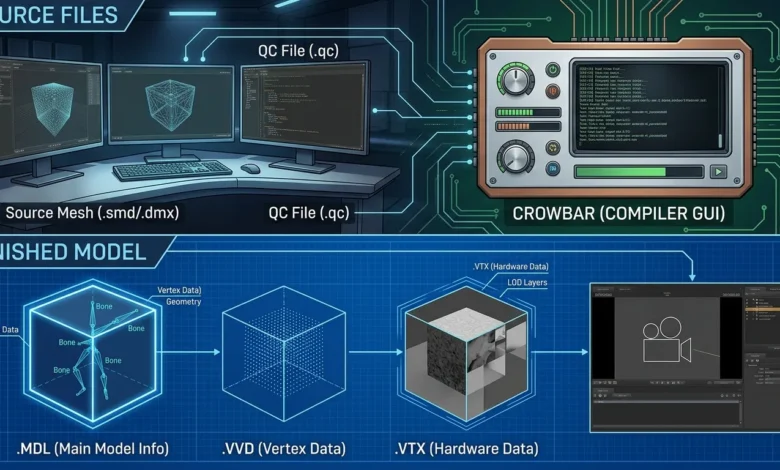
A typical workflow involves a model exported as SMD or DMX. That model is then described through a QC file. Crowbar passes the QC instructions to the Source compiler and produces the compiled model files.
The confusing part is that an SMD or DMX file is not the finished model that SFM uses. The compilation stage adds the information needed by the Source engine. This is why a model can exist on your computer but still fail to appear inside SFM.
Table of Contents
What Does This Process Actually Do?
SFM compile refers to converting source assets into a usable Source engine model.
For a custom model the basic chain looks like this:
Model → SMD or DMX → QC file → Crowbar → Source compiler → MDL model → SFM
The source mesh contains the model data. The QC file tells the compiler how that data should be assembled. Crowbar provides a convenient interface for running the compiler and viewing its output.
The finished model normally includes several related files. The MDL contains the main model information while VVD and VTX files contain additional model data used by the Source engine.
This distinction matters because changing the original SMD or DMX file does not automatically update the model that SFM loads. The model needs to be compiled again after relevant changes.
How Do You Compile a Model for SFM?
The simplest workflow is to prepare the source files first and then create a QC file that points to them.
For a basic model you need:
- An SMD or DMX model file
- A QC file
- The required textures and materials
- Crowbar
- A correctly configured Source Filmmaker game path
Place the model and QC files in a working folder. The QC file should reference the correct model filename and output location.
A basic QC structure can look like this:
$modelname "custom/my_model.mdl"
$body "body" "my_model.smd"
$cdmaterials "models/custom/"
$sequence "idle" "my_model.smd" fps 30
The exact commands depend on the type of model being compiled. A character with animations needs a different setup from a simple static prop.
Once the QC file is ready open Crowbar and select the compile function. Select the appropriate Source Filmmaker game configuration. Load the QC file and start the compile.
The compiler output is important. If the process fails the log normally gives the first useful clue about what went wrong. Community troubleshooting discussions also repeatedly point users toward the Crowbar compile log when a model does not compile correctly.
Also Read: BadSeed Tech Carpio: Features, Design, Sizes, and Buying Guide
Setting Up Crowbar for SFM
Crowbar is commonly used as the front end for the Source model compiler. It makes the compilation process easier to manage because you can select the QC file and inspect compiler output without working directly from a command window.
For Source Filmmaker you need to make sure Crowbar is using the correct SFM installation.
The important path is normally the SFM game directory:
Steam\steamapps\common\SourceFilmmaker\game\usermod
Your exact Steam installation path may differ.
After selecting the correct game configuration choose the QC file that contains your model instructions.
Then start the compilation and watch the log.
Do not judge the result only by whether Crowbar appears to finish. A compile can produce output while still reporting errors that prevent the model from working correctly.
What Should Be Inside the QC File?
The QC file is the instruction sheet for the compiler. It tells the compiler where the finished model should go, identifies the source mesh, and can define materials and sequences.
$modelname
This determines the location and name of the compiled MDL file.
$modelname "custom/my_model.mdl"
The path should match the model structure you want to use inside SFM.
$body
This points to the main model data.
$body "body" "my_model.smd"
If the referenced file does not exist in the expected location then compilation can fail.
$cdmaterials
This tells the compiler where the model materials are located.
$cdmaterials "models/custom/"
The material path needs to match the location of the VMT files used by the model.
$sequence
This defines a sequence for the model.
$sequence "idle" "my_model.smd" fps 30
A missing sequence can cause compilation problems. Recent Source community discussions show that the model has no sequences error is still a common issue when compiling simple props.
The correct QC structure depends on whether the asset is a prop, character, or animated model.
Compiling a Blender Model for SFM
Blender models need an additional export stage before the Source compiler can use them.
A common workflow is:
Blender → Blender Source Tools → SMD or DMX → QC → Crowbar → compiled model → SFM
Blender Source Tools can export model data into formats used by the Source workflow. The exported DMX or SMD file then becomes an input for the QC file.
A recent SFM community discussion describes this same basic process. The model is exported from Blender as DMX. A QC file is then created and Crowbar is used to compile the model.
The important point is that the Blender project itself is not what SFM loads. The exported Source compatible model data must go through compilation first.
If the model contains animations or facial flexes then the QC setup becomes more involved. A simple static prop can use a much smaller setup.
Why Is My Compiled Model Invisible in SFM?
An invisible model after a successful looking compile is usually a sign that something in the model pipeline is incorrect.
Start by checking the compiled files. Then check the model path inside SFM. Next check the QC references. A typo in $modelname or a missing source file can cause the compiled output to end up somewhere unexpected.
Materials are another common source of problems. The model may technically load while its textures fail because the VMT or VTF files are missing or stored under the wrong path.
The Source community has also reported cases where the model file exists but the model remains invisible. In these situations the model files and compiler output need to be checked rather than assuming that compilation succeeded correctly.
A useful troubleshooting order is:
- Check the Crowbar compile log.
- Check the generated MDL files.
- Verify the model path.
- Verify the QC file references.
- Check the material paths.
- Restart or refresh SFM and test the model again.
Why Does SFMCompile Say “Model Has No Sequences”?
This error is one of the more confusing problems for people compiling static props.
The reason is that a model can be visually static while the Source compiler still expects a valid sequence definition. A simple prop may therefore use an idle sequence that references the model data. Community examples show users solving this problem by adding an appropriate $sequence entry to the QC file.
$sequence "idle" "my_model.smd" fps 30
That is only an example. The correct sequence depends on how the model was exported. If the model is animated then the sequence should point to the appropriate animation data rather than simply copying a static setup.
What Does “Could Not Load File” Mean?
A message such as:
could not load file 'building.dmx'
usually means the compiler cannot find the file referenced by the QC.
This can happen because the filename is wrong, the extension is wrong, the file is in another folder, the QC path does not match the actual file location, or the file was renamed after the QC was created.
The compile log is the first place to check. A Source Filmmaker troubleshooting discussion shows a failed compile where the log directly identified the missing DMX file.
Do not immediately rewrite the entire QC file. First locate the exact file mentioned in the error.
Also Read: What Is Brasssmile? Understanding Its Content and Purpose
Why Does Crowbar Show an Access Violation Error?
EXCEPTION_ACCESS_VIOLATION indicates that the compiler encountered a serious failure while processing the model.
This message alone does not identify the exact cause. Check the lines immediately before the error. Look for the model or file that the compiler was processing at that moment.
The problem can involve the source model, QC instructions, exported data, or another part of the compilation setup. SFM users have reported this error while compiling models exported from Blender and other workflows.
The best approach is to isolate the failure rather than randomly changing several settings at once.
Compiling a Model From GMod for SFM
Models created for another Source game may need additional work before they function correctly in SFM.
A common approach is to obtain the required model files and inspect their QC structure. If the model has animation sequences that SFM does not currently have then those animation files may also need to be available in the correct SFM directory.
One SFM user reported solving an animation issue by copying the required animation files into the SFM model directory and then recompiling the QC with Crowbar.
This illustrates an important point: compiling the main model does not automatically provide every animation dependency. If the model depends on external animation files then those files must also be available to SFM.
Where Should Compiled Models Go?
The compiled model should be placed within the SFM game directory structure so that the model browser can find it.
A common usermod structure looks like:
SourceFilmmaker
└── game
    └── usermod
        ├── models
        │   └── custom
        └── materials
            └── models
                └── custom
The exact subfolder names can be changed to suit the project. What matters is consistency.
If the QC uses:
$modelname "custom/my_model.mdl"
then the resulting model should correspond to the expected models path. Likewise the $cdmaterials path needs to correspond with the location of the material files.
What If the Model Compiles but Textures Don’t Work?
Model compilation and texture setup are related but they are not exactly the same task. A model can compile successfully while its materials are missing.
Check that the VMT files exist in the expected materials directory. Then check that the VMT points to the correct VTF texture. The material path used in the QC must also match the structure expected by the model.
If the model appears with missing textures then focus on the material chain rather than recompiling the geometry repeatedly.
SFMcompile vs rendering: are they the same?
No.
Compilation prepares model assets so the Source engine can load them.
Rendering produces the final image or video from a scene.
For example a custom character may need to go through the compilation process before it can be loaded into an SFM session. Once that character is available you can animate the scene and render the finished project. Confusing these two processes can make troubleshooting much harder.
The Simplest Workflow, Step by Step
For a basic custom model the workflow can be reduced to this:
1. Prepare the model: Export the model from Blender or obtain compatible SMD or DMX data.
2. Create the QC file: Point the QC to the model data and define the required model path and sequence.
3. Prepare materials: Place the VMT and VTF files under the correct materials structure.
4. Open Crowbar: Select the appropriate Source Filmmaker configuration and load the QC.
5. Compile: Start the compile and inspect the complete log.
6. Check the output: Confirm that the MDL and associated model files were generated.
7. Load the model in SFM: Open the model browser and search for the compiled asset.
If it does not appear then check the output path before changing the model itself.
FAQs
What does SFM compile mean?
It is the process of converting Source compatible model data such as SMD or DMX into compiled model files that Source Filmmaker can load.
What program is commonly used for this process?
Crowbar is commonly used to run the Source model compiler and inspect its output. It is especially useful because the compile log remains visible when an error occurs.
Can Blender models be compiled for SFM?
Yes. A common workflow exports the model from Blender as SMD or DMX. A QC file then defines how the model should be compiled before Crowbar runs the compiler.
Why is my compiled model invisible in SFM?
Check the model path, QC references, compiled files, and material paths. An invisible model can result from missing model data or incorrect file locations.
Why does Crowbar say the model has no sequences?
The QC file may not contain a valid sequence definition. Static models can still require an appropriate sequence entry depending on the compilation setup.
Why does SFM not show my newly compiled model?
Check that the compiled files are inside the correct SFM game directory. Then verify the $modelname path and restart or refresh the model browser.
Conclusion
A successful sfmcompile depends on more than pressing the Compile button in Crowbar. The model data, QC instructions, material paths, and output location all need to work together.
For most custom model workflows the core path is straightforward:
SMD or DMX → QC → Crowbar → compiled model files → SFM
When something fails the compile log should be the first place to look. Errors such as missing source files and missing sequences often point directly toward the part of the workflow that needs attention.
The biggest mistake is treating an exported SMD or DMX file as a finished SFM model. It is source data that still needs to go through SFM compile before Source Filmmaker can load it.