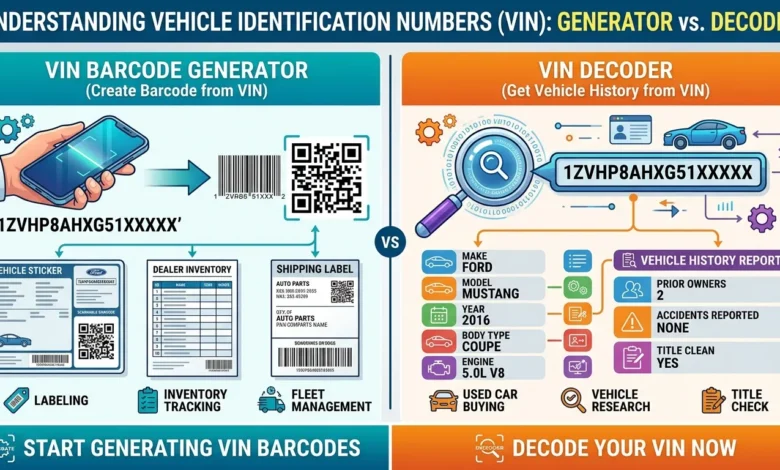
A VIN barcode generator turns your vehicle’s 17-character Vehicle Identification Number into a scannable barcode. This is different from a VIN decoder, which looks up a car’s history using that same number. Both tools deal with VINs, but they solve opposite problems and mixing them up is the single most common mistake people make when searching for either one.
If you already have a VIN and just need a working barcode for a label, an inventory sheet, or a dealer document, this guide walks through it step by step. It also covers what the 17 characters actually mean, which barcode format to use, and where VIN barcodes show up across the auto industry.
Table of Contents
VIN Barcode Generator vs. VIN Decoder: Which One Do You Need?
This mix-up trips a lot of people up, so let’s clear it first, before anything else.
- A VIN barcode generator takes a VIN you already know and turns it into a scannable barcode image. You’d use this if you’re labeling a car, building a dealer inventory sheet, tagging a fleet vehicle, or printing a document that needs a scannable code.
- A VIN decoder does the opposite. You give it a VIN, and it tells you the car’s make, model, year, and sometimes its accident or ownership history. You’d use this if you’re buying a used car and want to check it out before handing over money.
If you’re here to check a car’s history before buying it, you want a decoder, not a generator. If you already have the VIN and need a barcode for it, keep reading that’s what the rest of this guide covers.
What Is a VIN, Exactly?
VIN stands for Vehicle Identification Number. It’s a 17-character code made of numbers and capital letters, and every vehicle built after 1981 has one. No two vehicles share the same VIN it works like a fingerprint for the car.
The 17-character format became mandatory in the United States starting with the 1981 model year. It follows an international standard called ISO 3779. Cars built before 1981 can have shorter VINs, anywhere from 11 to 17 characters. That’s why older vehicles sometimes cause problems with VIN barcode generators and decoders — most of them only expect the modern 17-character format.
You’ll usually find a vehicle’s VIN in one of these spots:
- The dashboard, visible through the windshield on the driver’s side
- The driver’s side door jamb (open the door and look at the frame)
- The vehicle’s registration, title, and insurance paperwork
- Under the hood, near the engine block, on many vehicles
What Each Part of the VIN Means
The 17 characters aren’t random. Each section tells you something specific about the vehicle, and the sections have official names.
| Position | Section | What It Tells You |
|---|---|---|
| 1–3 | World Manufacturer Identifier (WMI) | Country and company that built the vehicle |
| 4–8 | Vehicle Descriptor Section (VDS) | Model, body style, engine type, and restraint system |
| 9 | Check Digit | A calculated digit used to catch data entry errors |
| 10 | Model Year | The vehicle’s model year (not always the same as the year it was built) |
| 11 | Assembly Plant | The specific factory where the vehicle was put together |
| 12–17 | Vehicle Identifier Section (VIS) | The vehicle’s unique serial number |
Characters 1–3: World Manufacturer Identifier (WMI)
These three characters identify the country and company that built the vehicle. A VIN starting with 1, 4, or 5 usually means it was assembled in the United States. A VIN starting with J points to Japan, and one starting with W typically points to Germany.
Characters 4–8: Vehicle Descriptor Section (VDS)
This section describes the vehicle itself the model, body style, engine type, and safety restraint system. Each manufacturer uses its own internal coding here. That’s part of why VINs are hard to decode by eye, without a lookup tool.
Character 9: The Check Digit
This single digit exists to catch errors. It’s calculated with a formula that checks every other character in the VIN. If someone mistypes a VIN, the check digit usually won’t match what the formula expects. That mismatch is a sign something in the string is wrong.
Characters 10–17: Vehicle Identifier Section (VIS)
This last stretch covers the model year (character 10), the assembly plant where the car was built (character 11), and the vehicle’s unique serial number (characters 12 through 17). That serial number is what makes this exact car different from every other car of the same model, built on the same line.
How to Generate a VIN Barcode
Once you have the 17-character VIN in hand, creating the barcode itself takes under a minute:
- Go to a barcode generator, like our free Barcode Generator.
- Choose Code 39 as the barcode type this is the traditional standard format for VINs.
- Type in the full 17-character VIN exactly as it appears, including all letters and numbers.
- Download the barcode as a PNG or SVG image.
Double-check every character before you generate the barcode. VINs never contain the letters O, I, or Q, since those can be confused with the numbers 0, 1, and 9. If your VIN seems to have one of these letters, you’ve likely mistyped it somewhere, and the barcode will encode an invalid VIN.
Which Barcode Format Is Used for a VIN?
Code 39 has been the standard for VIN barcodes for decades, and it’s still what you’ll see on most vehicles, especially older ones. It handles letters and numbers well, which is exactly what a 17-character alphanumeric VIN needs, and it’s supported by virtually every barcode scanner on the market.
That said, newer vehicles don’t always stick to Code 39. Some manufacturers have moved to two-dimensional formats that pack in more information:
| Format | Used By | Notes |
|---|---|---|
| Code 39 | Most manufacturers, especially older vehicles | The long-standing industry standard for VIN-only labels |
| Data Matrix | Some General Motors models | A compact 2D code that can survive partial damage and still scan |
| QR Code | Ford (on window stickers) | Used more for marketing and quick vehicle info than the core VIN label |
If you’re generating a barcode for a standard VIN label or an older vehicle, Code 39 is almost always the right choice.
Where VIN Barcodes Actually Get Used
VIN barcodes aren’t just a label on the windshield. They show up across several parts of the auto industry. Knowing the use case helps explain why the barcode, not just the printed number, matters so much.
- Dealership inventory. Dealers scan VIN barcodes when vehicles arrive, move between lots, or get appraised for trade-in, instead of typing all 17 characters by hand.
- Fleet management. Companies running delivery vans, rental cars, or company vehicles use VIN barcodes to track maintenance schedules and vehicle assignments across a fleet.
- Auto parts and repair shops. Technicians scan a VIN to pull up the exact vehicle’s service history and confirm they’re ordering the correct parts for that specific model.
- Insurance claims. Adjusters scan VIN barcodes to quickly attach the right vehicle record to a claim instead of manually transcribing a long alphanumeric string.
- Vehicle logistics and shipping. During transport from factory to dealership, VIN barcodes get scanned at checkpoints, sometimes alongside a second, more detailed 2D code carrying destination and shipment info.
In most of these settings, a mistyped VIN isn’t just annoying. It can attach the wrong service history, order the wrong part, or misfile an insurance claim. A scannable barcode exists to prevent exactly that kind of error.
Also Read: UPC Barcode Generator: How to Create One and When a Free One Won’t Work
A Note on Why VIN Barcodes Can Be Hard to Scan
VIN barcodes often sit on a door frame, dashboard edge, or engine bay. These spots aren’t always well lit, and they pick up dirt, scratches, or wear over time. This is one practical reason some manufacturers have shifted to Data Matrix codes for certain labels. 2D formats include built-in error correction, so the code can still scan correctly even if part of the label is scuffed or dirty. If you’re generating a barcode for a label that will sit somewhere exposed to the elements, this is worth keeping in mind.
Common Mistakes When Generating a VIN Barcode
Typing the VIN wrong. A single mistyped character makes the barcode encode a completely different, invalid VIN. Copy and paste the VIN whenever you can instead of typing it by hand.
Using the wrong barcode format. If your scanner or system expects Code 39 and you generate a QR code or Data Matrix instead, it won’t read correctly. Match the format to what your scanner actually supports.
Confusing a barcode generator with a VIN lookup tool. As covered above, a generator only creates the image — it won’t tell you anything about the vehicle’s history, recalls, or specs. For that, you need a separate VIN decoder.
Assuming every vehicle has a 17-character VIN. Vehicles built before 1981 can have shorter VINs. If a generator rejects your input, check whether you’re working with a pre-1981 vehicle first.
FAQs
What is a VIN barcode?
A VIN barcode is a scannable version of a vehicle’s 17-character Vehicle Identification Number. It lets dealerships, repair shops, and registration systems scan the VIN instead of typing it in by hand.
Why does my car have a VIN barcode?
Every vehicle built after 1981 is assigned a VIN, and most manufacturers print it as a barcode on the dashboard, door jamb, or paperwork so it can be scanned quickly and accurately.
What barcode format is used for a VIN?
Code 39 is the traditional and most common format. Some newer vehicles use Data Matrix or QR codes instead, depending on the manufacturer.
Can I generate a VIN barcode myself?
Yes. Any Code 39 barcode generator can turn a 17-character VIN into a scannable barcode image, as long as you enter the VIN correctly.
Where is the VIN barcode located on a car?
Most commonly on the dashboard (visible through the windshield), the driver’s side door jamb, under the hood near the engine, and on vehicle registration or insurance documents.
Do all cars have a VIN barcode?
All vehicles manufactured after 1981 have a standardized 17-character VIN, and most are labeled with a matching barcode somewhere on the vehicle or its paperwork. Vehicles built before 1981 may have a shorter VIN and may not follow the same barcode standard.
Why do some VIN barcodes fail to scan?
Poor lighting, dirt, scratches, or a mismatched barcode format are the most common reasons. Some newer vehicles use 2D formats like Data Matrix specifically because they include error correction and can still scan even when partially damaged.