Artificial intelligence has made it easier to create videos, digital avatars, and other visual content without advanced editing skills. A2E AI is one of the platforms built for this purpose, offering tools that help users generate AI avatars, convert images into videos, perform face swaps, synchronize lip movements with audio, and create visual content from text prompts.
Instead of focusing on a single feature, the platform combines several creative tools into one workspace. This makes it useful for content creators, marketers, educators, developers, and businesses looking to produce videos and digital media more efficiently.
This guide explains what the platform is, how it works, what you can create with it, whether it offers a free plan, API availability, pricing, limitations, and who may benefit most from using it.
Table of Contents
What Is A2E AI?
A2E AI is an AI-powered content creation platform designed to help users generate digital media through automated workflows. Rather than relying on traditional video editing software, it allows creators to produce avatars, animated videos, voice-enabled presentations, and other visual assets using simple prompts or uploaded media.
The platform combines multiple creative tools into one interface, making it easier to move from an idea to a finished project without switching between several applications.
People commonly use it for:
- Marketing videos
- Social media content
- Product presentations
- Online courses
- Business demonstrations
- Educational materials
- Creative storytelling
Because different tools are available within the same platform, users can manage several content creation tasks from one workspace.
What Can You Create With It?
The platform supports multiple types of AI-generated content, allowing users to choose the workflow that best matches their project.
AI Avatars
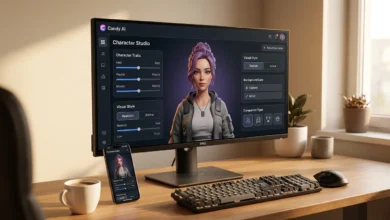
Users can generate digital presenters that speak scripted content for tutorials, product demonstrations, training videos, and marketing campaigns. Avatar customization options typically include appearance, expressions, and presentation style.
Image-to-Video Generation
A static image can be transformed into a short animated video by adding movement and realistic facial expressions. This feature is commonly used for promotional content, storytelling, and social media videos.
Face and Head Swaps
The platform also provides tools for replacing or modifying faces in supported images and videos. These features are generally used for creative projects, demonstrations, and entertainment content where appropriate permissions have been obtained.
Voice Cloning and Lip Sync
Users can combine audio with animated characters so that lip movements match spoken dialogue more naturally. This helps create realistic presentations without manually editing each frame.
AI Image Generation
Text descriptions can be converted into original images that serve as standalone graphics or visual assets for larger video projects.
See Also: DarLink AI What It Is, How It Works, and What You Can Do With It
How the Platform Works
The workflow is designed to remain simple, even for first-time users.
After creating an account, users select the type of content they want to produce. Depending on the chosen feature, they either upload source material or enter a text prompt describing the desired result.
Once the project settings are configured, the platform processes the request and generates the output automatically. Users can then preview the content, make adjustments if necessary, and export the finished project.
Because several creation tools are available within one interface, projects can often move from concept to final output without using additional editing software.
Creating a Video From an Image
One of the most widely used workflows begins with a single image.
Users upload a portrait, illustration, or other supported image, choose the preferred animation style, and add optional narration or audio where available. After processing, the platform generates a short animated video based on the selected settings.
The overall quality depends on the source image, animation options, and project configuration. Higher-quality images generally produce better visual results.
Making an AI Avatar
Creating an avatar usually involves selecting a character template or customizing one from scratch.
Users can provide text for narration or upload recorded audio, choose available voice settings, and generate a talking avatar suitable for presentations, training materials, promotional videos, or educational content.
This workflow helps reduce the time and resources normally required for traditional video production while making updates easier whenever content needs to be revised.
Is It Free to Use?
Many users want to know whether A2E AI can be used without purchasing a subscription. A free plan or trial may be available, allowing new users to explore the platform and test its core features before upgrading.
However, the available tools, generation limits, export quality, and usage allowances often vary between free and paid plans. Because pricing and plan details can change over time, it’s a good idea to review the latest subscription information before choosing a plan.
Users who create content occasionally may find the free option sufficient, while professionals producing videos regularly may benefit from higher limits and additional features.
Plans and Pricing
The platform generally offers multiple subscription options to suit different types of users.
Entry-level plans are suitable for individuals who create content occasionally, while higher-tier plans are designed for creators, businesses, and teams that require more frequent content generation, faster processing, or access to advanced features.
Before upgrading, compare the available plans based on your expected workload instead of selecting a subscription solely because it offers more features.
Can Developers Use the API?
For businesses and developers, API access can be an important consideration.
Where available, an API allows developers to integrate AI-powered media generation into websites, applications, or internal workflows. This can help automate repetitive tasks, build custom solutions, or incorporate content generation into existing software.
API availability, documentation, and supported features may vary, so developers should review the latest technical documentation before starting a project.
Also Read: Meshy AI: What It Is, How to Create 3D Models, and How It Works
Who Is It Best For?
The platform is suitable for a wide range of users depending on their content creation needs.
Content Creators
Creators can produce engaging videos, AI avatars, and social media content without relying on traditional video production tools.
Marketing Teams
Businesses can create promotional videos, advertisements, product demonstrations, and branded presentations more efficiently.
Educators and Trainers
Teachers and trainers can develop instructional videos, online lessons, and learning materials using AI-generated presenters.
Developers
Developers can explore API integration where available to automate media creation within their own applications.
Businesses
Organizations looking to create internal training videos, customer support materials, or presentation content may also benefit from the platform’s automation features.
Current Limitations
Although the platform offers several creative tools, it still has practical limitations.
The quality of generated videos depends on the uploaded media, selected settings, and project complexity. Some outputs may require additional editing before publication, especially for professional projects.
Certain advanced features may only be available on paid plans, and processing times can vary depending on server demand and the complexity of the requested task.
Users should also review generated content carefully to ensure it accurately represents their intended message before sharing it publicly.
FAQs
What is A2E AI?
It is an AI-powered platform that helps users create avatars, videos, images, and other digital content through automated workflows.
Is it free to use?
A free option may be available, while paid plans typically provide additional features, higher generation limits, and expanded capabilities.
Can I turn an image into a video?
Yes. The platform includes image-to-video tools that animate supported images into short videos.
Can I create a talking avatar?
Yes. Users can generate AI avatars that present text or audio with synchronized facial movements.
Does it support voice cloning?
Voice-related features may be available depending on the selected tools and subscription plan.
Is an API available?
API access may be offered for developers and businesses that want to integrate AI-powered media generation into their own applications or workflows.
Conclusion
A2E AI brings together multiple content creation tools in a single platform, making it easier to produce AI avatars, animated videos, image-based animations, and other digital media without extensive editing experience. Its combination of creative workflows makes it suitable for individuals, businesses, educators, and developers looking to streamline content production.
Whether the platform is the right choice depends on the type of projects you create, how often you generate content, and which features matter most for your workflow. Exploring the available plans and testing the platform can help determine whether it meets your creative needs.