HR software solutions help organizations manage employee records, payroll, hiring, onboarding, benefits, time tracking, performance, compliance, and workforce reporting from one connected platform.
The right choice depends on more than company size. A ten-person US business may need payroll and benefits administration, while a multinational company may require global employee records, localized payroll, workforce planning, role-based permissions, and integrations with finance systems.
No single platform is the leading option for every organization. The best fit depends on workforce location, payroll complexity, internal HR resources, required modules, and whether the company wants software alone or outsourced HR support.
Table of Contents
Which Type of HR Software Solution Does Your Business Need?
Before comparing vendors, determine which category matches your operational requirements.
| Solution type | Main purpose | Best suited for |
|---|---|---|
| Core HRIS | Stores employee records and manages basic HR workflows | Companies replacing spreadsheets or disconnected employee files |
| HRMS | Adds payroll, benefits, time, attendance, and transactional HR processes | Businesses that want core HR and workforce administration together |
| HCM platform | Covers core HR, payroll, recruiting, talent, learning, compensation, planning, and analytics | Midsize and enterprise organizations managing the full employee lifecycle |
| Payroll-first HR platform | Uses payroll as the central system and adds onboarding, benefits, time, and HR tools | Small and growing businesses with payroll as their main requirement |
| Global employment platform | Manages international employees, contractors, payroll, and country-specific workflows | Distributed companies hiring across several countries |
| PEO platform | Combines HR software with payroll, benefits, compliance support, and co-employment services | Small or midsize US businesses that want to outsource major HR responsibilities |
An HRIS mainly acts as the system of record for employee information. An HRMS extends that record into administrative workflows, while an HCM platform normally covers a broader employee lifecycle that may include recruiting, learning, compensation, workforce planning, and advanced reporting.
A PEO is different from ordinary HR software. Under a PEO arrangement, the provider takes responsibility for selected payroll, tax, benefits, workers’ compensation, and compliance functions while the client continues managing employees’ daily work.
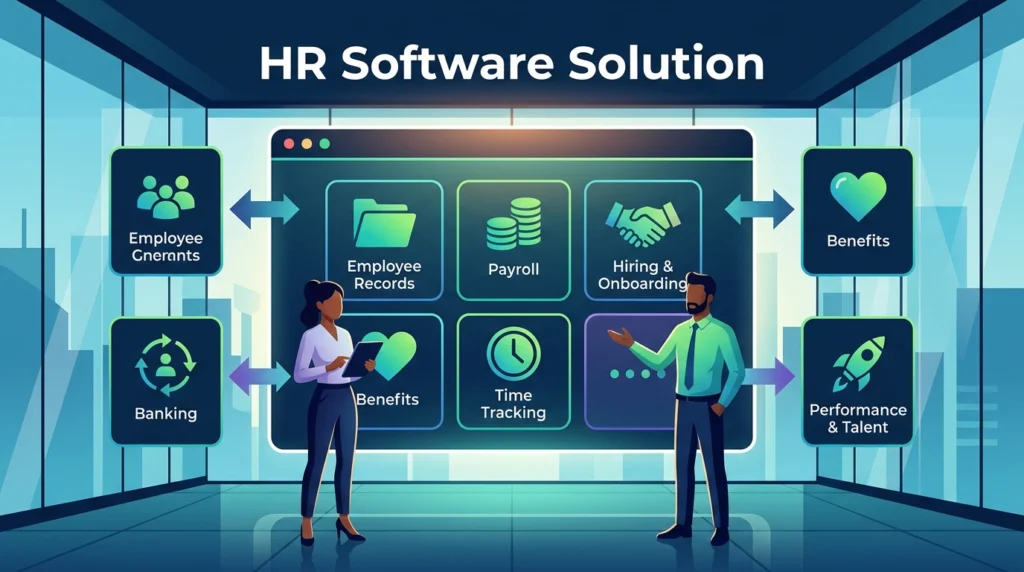
Capabilities HR Software Solutions Should Connect
A product does not become an all-in-one HR platform simply because it offers several modules. The important question is whether those modules share the same employee data and update one another without repeated manual entry.
Employee Records and Organizational Data
The central employee profile should include:
- Personal and contact information
- Job title and department
- Manager and reporting relationships
- Employment status
- Work location
- Compensation history
- Documents and acknowledgements
- Leave balances
- Benefits eligibility
- Emergency contacts
- Custom company fields
Administrators should be able to control which fields employees, managers, payroll staff, recruiters, and HR leaders can view or edit.
Hiring and Onboarding
Recruiting and onboarding tools may include:
- Job requisitions
- Applicant tracking
- Interview stages
- Offer letters
- Background-check integrations
- Digital forms
- New-hire task lists
- Policy acknowledgements
- Equipment requests
- Payroll enrollment
- Benefits enrollment
The strongest workflow moves an approved candidate into the employee record without requiring HR to recreate the same profile manually.
Payroll, Time, and Benefits
Payroll should receive approved information from employee records, time tracking, leave, benefits, and compensation modules.
During a demonstration, check whether the platform supports:
- Salaried and hourly workers
- Multiple pay rates
- Overtime rules
- Bonuses and commissions
- Deductions and garnishments
- Paid time off
- Payroll tax filing
- Benefits deductions
- Accounting exports
- Payroll corrections
- Audit history
Gusto positions payroll, tax filing, benefits, time, onboarding, talent management, and reporting within one small-business platform. BambooHR connects employee records, time off, benefits, time tracking, and US payroll data within its platform.
Performance and Talent Management
Talent modules should support the organization’s actual review process rather than forcing every employee into the same template.
Useful capabilities include:
- Goals
- One-to-one meetings
- Manager reviews
- Self-assessments
- Peer feedback
- Compensation reviews
- Development plans
- Succession planning
- Learning assignments
- Skills records
BambooHR, Workday, SAP SuccessFactors, ADP Workforce Now, HiBob, and Oracle provide broader talent or performance capabilities in addition to core employee administration.
Reporting and Workforce Planning
Basic reports should answer operational questions such as:
- How many employees are active?
- Which contracts or certifications are expiring?
- Which teams have open positions?
- How much overtime is being recorded?
- What is the current headcount cost?
- Which employees have incomplete onboarding tasks?
- How has turnover changed by department or location?
Larger organizations may also require position control, headcount planning, compensation budgets, succession data, scenario modeling, and connections between HR and financial planning.
Also Read: Productivity Software Examples: Definition, Types, and Practical Uses
What Are the Leading HR Software Solutions?
The leading vary by business size and operating model. Current comparison guides regularly include platforms such as Rippling, BambooHR, Gusto, ADP Workforce Now, Deel, Workday, SAP SuccessFactors, HiBob, and Oracle Cloud HCM, but the recommended order changes according to the reviewer’s criteria.
The following comparison focuses on product fit rather than declaring one universal winner.
| Platform | Suitable use case | Notable scope |
|---|---|---|
| Gusto | Small US businesses prioritizing payroll | Payroll, tax filing, benefits, hiring, onboarding, time, and basic talent tools |
| BambooHR | Small and midsize companies wanting an approachable HRIS | Employee records, applicant tracking, onboarding, payroll, benefits, time, performance, and reporting |
| Rippling | Growing companies wanting HR, payroll, and workplace administration together | HRIS, payroll, benefits, recruiting, performance, time, global workforce, workflows, and IT administration |
| ADP Workforce Now | Midsize North American organizations with detailed payroll needs | HR, payroll, time, benefits, talent, compensation, reporting, and integrations |
| HiBob | Growing and distributed midsize organizations | Core HR, time, talent, payroll connections, benefits, planning, and employee experience |
| Deel | International teams managing employees and contractors | Global HR records, local and global payroll, contractor management, hiring, and country-specific workflows |
| Workday HCM | Large organizations with complex workforce and planning requirements | Core HCM, talent, payroll, workforce management, planning, analytics, and employee experience |
| SAP SuccessFactors | Global enterprises, particularly those using SAP systems | Core HR, localized payroll, talent, learning, compensation, analytics, and workforce planning |
| Oracle Cloud HCM | Enterprises connecting HR with finance and other Oracle applications | Core HR, talent, workforce management, payroll, analytics, and employee experience |
Gusto for Payroll-First Small Businesses
Gusto is designed around payroll but also includes benefits, time and attendance, hiring, onboarding, talent management, and reporting. Its connected structure makes it suitable for a small business that does not need a heavily configurable enterprise HCM platform.
A buyer should still confirm state coverage, benefits availability, contractor requirements, accounting connections, support levels, and which features require higher plans or add-ons.
BambooHR for Core HR and Employee Lifecycle Management
BambooHR provides a central record for employee data alongside applicant tracking, onboarding, time, payroll, benefits, performance, compensation, and compliance tools. Its US payroll product supports federal, state, and local tax filing, while international payroll may require supported providers or marketplace partners.
It may suit an organization moving from spreadsheets or separate HR tools but not yet requiring the scale or configuration depth of a large enterprise platform.
Rippling for Connected HR, Payroll, and IT Workflows
Rippling combines HCM modules with payroll, benefits, time, recruiting, performance, learning, global workforce management, permissions, workflow automation, and IT administration. Its platform is particularly relevant when onboarding or offboarding must also trigger application access, device assignments, or finance tasks.
Companies should identify which modules are essential because an expandable platform can become more expensive and complex as additional products are added.
ADP Workforce Now for Midsize Payroll and Workforce Administration
ADP Workforce Now connects payroll, HR, benefits, time, talent, and reporting for midsize organizations. ADP also supports US and Canadian workforce management and offers integrations for connecting HR, payroll, benefits, and financial data.
It is worth considering when payroll depth and service support carry more weight than having the simplest possible interface.
HiBob for Growing Midsize and Distributed Teams
HiBob’s platform uses its Core HRIS as the central source for people, organizational, and role data. It then connects time, talent, payroll and benefits, workforce planning, and finance-related modules.
It may fit organizations that need more employee-lifecycle and planning capabilities than a basic HRIS but do not want a traditional enterprise deployment.
Deel for International Employment and Payroll
Deel supports global HR records, local and global payroll, contractor management, benefits, workflows, compliance resources, and international hiring. It also integrates with external HRIS products, allowing companies to use Deel for global employment while retaining another system as the main employee record.
Buyers should check which countries, worker types, payroll services, entities, benefits, and integrations are supported for their exact hiring locations.
Workday, SAP SuccessFactors, and Oracle for Enterprise HCM
Workday HCM covers core HR, talent, workforce management, planning, analytics, payroll, and employee experience. It is designed for organizations requiring a unified enterprise platform with extensive configuration and global workforce capabilities.
SAP SuccessFactors covers core HR and payroll, talent and learning, workforce analytics, and planning, with localized HR and payroll support across many countries and territories.
Oracle Cloud HCM connects HR, talent, workforce management, payroll, and employee experience through a shared cloud platform that can also connect with Oracle finance and operational applications.
These enterprise platforms usually require more detailed process design, implementation support, data migration, configuration, testing, and change management than small-business software.
How to Compare Leading HRIS Solutions for HR Software Needs
A vendor shortlist should be based on operational requirements rather than brand recognition.
Match the Platform to Workforce Structure
Document:
- Total employee count
- Expected growth
- Countries and states
- Employee and contractor mix
- Salaried and hourly workers
- Remote and onsite locations
- Union or collective-agreement requirements
- Seasonal workforce changes
- Multiple legal entities
- Payroll frequencies
A company with 75 employees in one US state has different requirements from a company with 700 workers across ten countries.
Separate Required Modules from Optional Features
Create three categories:
Required at launch
These are workflows the system must support immediately, such as payroll, employee records, time tracking, benefits, or onboarding.
Required within 12 months
These may include performance reviews, recruiting, learning, compensation planning, or additional countries.
Optional
These features may be useful but should not influence the purchase unless their value can be clearly demonstrated.
This prevents an impressive feature list from distracting buyers from missing core requirements.
Test the Entire Employee Lifecycle
Ask vendors to demonstrate realistic workflows:
- Create a job requisition.
- Move a candidate through recruiting.
- Generate an offer.
- Convert the candidate into an employee.
- Assign onboarding tasks.
- Enroll the employee in payroll and benefits.
- Record time off.
- Change the employee’s manager or compensation.
- Run a performance review.
- Process an offboarding event.
The demonstration should show where data moves automatically and where manual intervention is required.
Verify Integrations at Field Level
Do not accept “we integrate with your accounting system” as a complete answer.
Confirm:
- Which employee and payroll fields synchronize
- Whether the connection is one-way or two-way
- How often it updates
- How errors are reported
- Whether historical data is transferred
- Whether custom fields are supported
- Whether the integration costs extra
- Who supports the connection when it fails
Also check availability of APIs, webhooks, SSO, directory synchronization, and prebuilt marketplace integrations.
Choosing the Best PEO for HR Software Solutions
The best PEO is the provider that combines usable technology with the level of benefits, payroll, compliance, risk, and HR support the business actually needs.
A PEO should not be selected as if it were only a software subscription. The agreement can affect payroll processing, benefits plans, workers’ compensation, tax administration, compliance responsibilities, and the process for leaving the service.
Commonly considered options include:
| PEO | Suitable consideration |
|---|---|
| Justworks PEO | Small US businesses wanting payroll, HR tools, benefits access, compliance resources, and 24/7 support |
| ADP TotalSource | Small and midsize employers wanting a broad PEO platform with payroll, benefits, HR guidance, risk support, and recruiting tools |
| TriNet PEO | Small and midsize companies seeking payroll, benefits, risk support, HR services, and an integrated technology platform |
| Rippling PEO | Growing businesses that want PEO services connected with Rippling’s wider HR and workforce platform |
Justworks combines payroll, HR, benefits, compliance support, analytics, integrations, and HR consulting within its PEO plans.
ADP TotalSource combines payroll, tax, benefits, HR guidance, compliance support, recruiting, reporting, and employee self-service. ADP identifies it as an IRS-certified PEO for small and midsize businesses.
TriNet offers PEO services covering benefits, payroll processing, risk mitigation, HR support, and an integrated software platform for recruiting, onboarding, payroll, and benefits administration.
Before selecting a PEO, request clear answers about:
- Administrative and per-employee fees
- Health plan options
- Workers’ compensation
- Payroll tax responsibilities
- HR support availability
- Employment-practice support
- State coverage
- Minimum employee requirements
- Contract length
- Termination fees
- Data export
- Benefit changes after leaving
- Transitioning from the PEO to standalone software
Pricing and Contract Questions to Ask Vendors
HR software pricing may be based on employees, administrators, modules, payroll runs, countries, implementation services, support levels, or a combination of these factors.
Ask every shortlisted provider for a complete three-year cost estimate that includes:
- Base subscription
- Per-employee charges
- Payroll fees
- Implementation
- Data migration
- Integrations
- Premium support
- Training
- Tax registration
- Benefits administration
- Time clocks or hardware
- Global employment services
- Annual price increases
- Contract renewal terms
Also ask what happens when employee numbers decrease. Some contracts are based on a committed headcount rather than actual active users.
HR Software Implementation and Data Migration
A successful implementation begins before the vendor receives the first spreadsheet.
Clean the Employee Data
Review duplicate records, inactive employees, incorrect job titles, missing managers, outdated addresses, inconsistent departments, and incomplete tax or benefits information.
Migrating poor-quality data into a new system creates a cleaner interface with the same underlying problems.
Define the System of Record
Decide which platform owns each type of data:
- Employee profile
- Payroll
- Time and attendance
- Benefits
- Recruiting
- Performance
- Learning
- Expenses
- Identity and application access
- Finance and cost centers
Two systems should not both be treated as the master source for the same field unless synchronization rules are clearly defined.
Configure Permissions Before Importing Sensitive Data
Create separate access levels for:
- Employees
- Managers
- Recruiters
- Payroll staff
- Benefits administrators
- HR administrators
- Finance teams
- IT administrators
- Executives
- External consultants
Test whether users can view compensation, identification, health, disciplinary, payroll, and performance data that does not belong to their role.
Test Payroll in Parallel
When payroll is changing, run the new and previous processes in parallel before final cutover.
Compare:
- Gross pay
- Taxes
- Benefits deductions
- Retirement deductions
- Overtime
- Paid leave
- Garnishments
- Bonuses
- Employer contributions
- Accounting totals
- Net pay
Investigate every unexplained difference before the new system becomes the official payroll source.
Prepare a Reversal Plan
Document how the company will respond if:
- Payroll calculations fail
- An integration stops synchronizing
- time records are missing
- Benefits deductions are incorrect
- employees cannot access the platform
- incorrect permissions expose private data
Its manage sensitive operational processes, so launch planning should include recovery steps rather than assuming every configuration will work correctly on the first attempt.
FAQs
What are the leading HR software solutions for small businesses?
Gusto, BambooHR, Rippling, and Justworks are commonly considered by small or growing US businesses. Gusto is payroll-first, BambooHR emphasizes core HR and employee lifecycle management, Rippling connects HR with payroll and IT administration, and Justworks combines software with PEO services.
What is the difference between HR software and an HRIS?
HR software is the broad category covering tools for managing people-related processes. An HRIS is specifically the central system for storing employee records and supporting core HR administration.
Is payroll normally included in HR software?
Some platforms include native payroll, while others connect with external payroll providers. Buyers should verify country coverage, tax filing, payroll frequency, worker types, integrations, and whether payroll requires an additional module.
Is a PEO better than standalone HR software?
A PEO may be more suitable when a business wants payroll, benefits, compliance support, and HR guidance as a managed service. Standalone software may be more appropriate when the company has internal HR expertise and wants greater control over vendors, processes, and benefits.
Can a small business use enterprise HCM software?
It can, but the implementation effort, configuration, cost, and administrative requirements may exceed what the business needs. A smaller HRIS or payroll-first platform may deliver faster value with less complexity.
How long does HR software implementation take?
The timeline depends on employee count, payroll complexity, countries, integrations, data quality, modules, and approval processes. A basic employee-record implementation is much simpler than replacing payroll, benefits, recruiting, time, and enterprise HCM systems simultaneously.
What data should be migrated to a new HR platform?
Common data includes active employee profiles, job history, compensation, tax information, leave balances, documents, benefits enrollment, payroll history, performance records, and reporting relationships. Historical data should be migrated only when it has a defined operational, reporting, or retention purpose.
Conclusion
Choosing between HR software solutions starts with identifying the correct product category. Small businesses may need a payroll-first platform or PEO. Growing organizations may need an HRIS with recruiting, performance, time, and benefits. Global and enterprise employers may require a full HCM platform with localized payroll, workforce planning, detailed permissions, and finance integrations.
Build requirements around real employee workflows, test those workflows during demonstrations, calculate the full contract cost, and verify data migration, security, payroll, and integration responsibilities before making the final decision.