
Productivity software examples include Microsoft Word, Google Docs, Microsoft Excel, Google Sheets, PowerPoint, Asana, Trello, Slack, Notion, Dropbox, and Adobe Acrobat.
These programs help people write documents, manage data, organize projects communicate with coworkers, schedule meetings, store files, and complete daily work. Some tools focus on one task while others combine several functions in one platform.
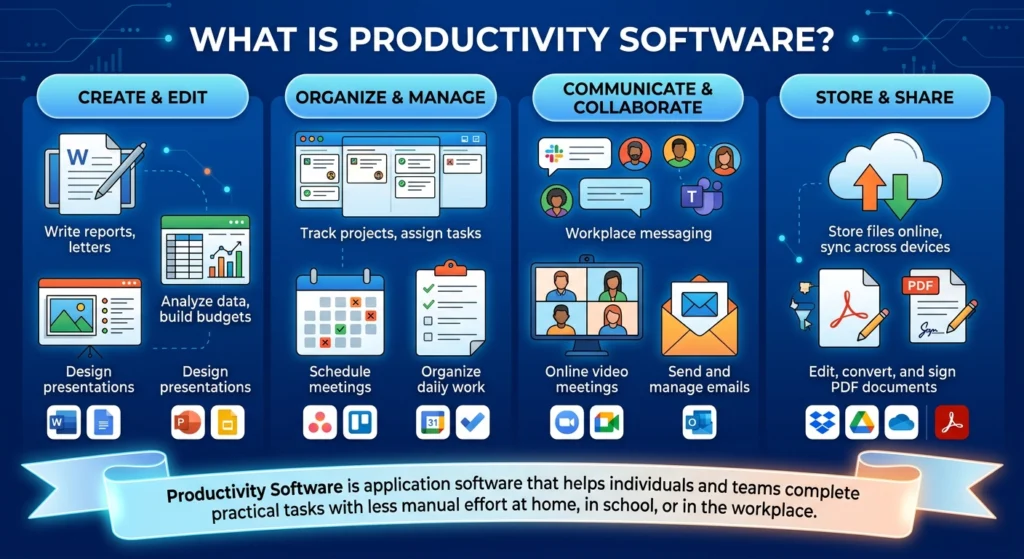
Productivity software is application software created to help individuals and teams complete useful tasks with less manual effort. It may be used at home, in school in an office or across a remote workplace.
Table of Contents
What Is Productivity Software?
Productivity software is a category of computer and mobile applications used to create, organize, edit, manage, store, or share information.
A word processor helps users create written documents. A spreadsheet helps users organize numbers and perform calculations. A project management platform helps teams assign tasks and track deadlines.
The purpose of productivity software is not limited to saving time. It also helps reduce mistakes, keep records organized, improve collaboration, and make information easier to find.
Common tasks handled by productivity applications include:
- Writing reports
- Creating spreadsheets
- Preparing presentations
- Managing projects
- Scheduling appointments
- Sending workplace messages
- Recording notes
- Sharing files
- Editing PDF documents
- Tracking personal tasks
The exact meaning can change depending on how a program is used. A calendar application may help one person manage personal appointments while a company may use the same software to coordinate meetings across several departments.
Productivity Software Definition and Examples
A simple productivity software definition is:
Productivity software is a type of application software that helps users create information and complete practical tasks.
Examples of productivity software include:
- Microsoft Word for documents
- Microsoft Excel for spreadsheets
- Google Slides for presentations
- Asana for project management
- Slack for workplace communication
- Notion for notes and shared information
- Dropbox for file storage
- Adobe Acrobat for PDF files
These programs are different from system software.
Windows and macOS are operating systems. They manage the device and allow other applications to run. Productivity programs work inside the operating system and help the user perform specific activities.
Also Read: Visitor Management Software: Features, Selection Criteria, Setup, and Use Cases
25 Common Productivity Software Examples
The following productivity software examples cover writing, calculations, presentations, communication, planning, file storage, and document management.
| Software | Type | Main use |
|---|---|---|
| Microsoft Word | Word processor | Reports, letters, resumes, and contracts |
| Google Docs | Word processor | Shared online documents |
| LibreOffice Writer | Word processor | Offline document creation |
| Microsoft Excel | Spreadsheet | Calculations, budgets, and data analysis |
| Google Sheets | Spreadsheet | Shared spreadsheets and trackers |
| LibreOffice Calc | Spreadsheet | Offline calculations and tables |
| Microsoft PowerPoint | Presentation | Slide presentations |
| Google Slides | Presentation | Online presentation creation |
| Apple Keynote | Presentation | Slides on Apple devices |
| Asana | Project management | Tasks, deadlines, owners, and projects |
| Trello | Task management | Boards, lists, and cards |
| Microsoft To Do | Task management | Personal tasks and reminders |
| Slack | Communication | Channels and workplace messages |
| Microsoft Teams | Communication | Chat, meetings, calls, and files |
| Zoom | Video meetings | Online meetings and screen sharing |
| Google Meet | Video meetings | Browser-based video calls |
| Notion | Workspace | Notes, databases, projects, and guides |
| Microsoft OneNote | Note-taking | Organized digital notebooks |
| Google Keep | Note-taking | Quick notes and reminders |
| Google Calendar | Scheduling | Meetings and shared calendars |
| Microsoft Outlook | Email and calendar | Email, meetings, and contacts |
| Google Drive | Cloud storage | Online files and shared folders |
| Dropbox | Cloud storage | File storage and synchronization |
| Microsoft OneDrive | Cloud storage | File access across devices |
| Adobe Acrobat | PDF management | Editing, converting, and signing PDFs |
A person may use several of these applications during one project.
For example, a team could write a proposal in Google Docs, prepare costs in Microsoft Excel, discuss changes in Slack, store the final files in Dropbox, and track the deadline in Asana.
Word Processing Productivity Software Examples
Word processing software helps users create and edit text-based documents.
These applications usually provide tools for:
- Font formatting
- Paragraph alignment
- Headings
- Tables
- Images
- Page numbers
- Headers and footers
- Spelling checks
- Comments
- Track changes
- Printing
- File export
Microsoft Word
Microsoft Word is commonly used for:
- Business reports
- School assignments
- Resumes
- Cover letters
- Contracts
- Proposals
- Manuals
- Meeting notes
It supports common document formats such as DOCX, DOC, RTF, TXT, and PDF.
Word is suitable for documents that require detailed formatting, printed pages, references, tables, and structured layouts.
Google Docs
Google Docs is a browser-based word processor.
It allows several people to work on the same document. Users can add comments, suggest changes, review earlier versions, and control who can view or edit the file.
It is useful for:
- Team reports
- Shared content drafts
- Classroom assignments
- Meeting agendas
- Client documents
- Remote collaboration
LibreOffice Writer
LibreOffice Writer is a desktop word processor.
It can be used to create letters, reports, forms, and other written documents. It is often selected by users who want an installed program that can work without an internet connection.
Spreadsheet Productivity Software Examples
Spreadsheet software stores information in rows, columns, and cells.
It can perform calculations by using formulas and functions. It can also create charts, sort records, filter information, and summarize large sets of data.
Microsoft Excel
Microsoft Excel is one of the most familiar productivity software examples.
It is used for:
- Budgets
- Invoices
- Financial records
- Sales reports
- Employee schedules
- Inventory lists
- Data analysis
- Forecasts
- Project costs
Excel includes tools such as formulas, functions, tables, charts, pivot tables, data validation, filters, and conditional formatting.
Common Excel file formats include XLSX, XLS, CSV, and XLSM.
Google Sheets
Google Sheets is an online spreadsheet application.
It is useful when several people need to update the same file. Team members can enter data, add comments, review changes, and share the spreadsheet through permission settings.
Common uses include:
- Content calendars
- Expense tracking
- Lead lists
- Attendance records
- Inventory trackers
- Project schedules
- Simple databases
LibreOffice Calc
LibreOffice Calc is an offline spreadsheet program.
It supports formulas, tables, charts, filters, and common spreadsheet formats. It may be suitable for users who want a desktop tool without relying on a browser.
Presentation Productivity Software Examples
Presentation software helps users explain information through slides.
A presentation can include:
- Text
- Images
- Charts
- Tables
- Videos
- Diagrams
- Audio
- Animations
- Speaker notes
Microsoft PowerPoint
Microsoft PowerPoint is used for:
- Business presentations
- Sales proposals
- Training sessions
- Classroom lessons
- Project reports
- Webinars
- Conference talks
Its main file format is PPTX.
PowerPoint is useful when the user needs detailed slide control, visual layouts, charts, transitions, and presenter tools.
Google Slides
Google Slides is an online presentation application.
It allows users to create slides in a browser and invite other people to edit or comment. It is helpful for teams that need to prepare a presentation together.
Apple Keynote
Apple Keynote is designed for macOS, iPhone, and iPad users.
It provides slide templates, animations, charts, media tools, and presentation controls. It is commonly used by people working within Apple’s software environment.
Project Management Productivity Software Examples
Project management software helps teams plan work and track progress.
It can show:
- Tasks
- Task owners
- Due dates
- Priorities
- Dependencies
- Project stages
- Files
- Comments
- Approvals
- Completion status
Asana
Asana is used to create projects and assign tasks to team members.
A task can include:
- A title
- Description
- Owner
- Due date
- Subtasks
- Attachments
- Comments
- Priority
- Custom fields
A content team may use Asana to manage keyword research, writing, editing, design, approval, and publication.
Trello
Trello organizes work through boards, lists, and cards.
A board can represent a project. Lists can represent different stages. Cards can represent individual tasks.
A simple workflow may include:
- Ideas
- To Do
- In Progress
- Under Review
- Completed
Trello works well for visual planning, editorial calendars, simple projects, hiring pipelines, and personal tasks.
Microsoft To Do
Microsoft To Do focuses on personal task management.
Users can create lists, set due dates, add reminders, repeat tasks, and mark work as completed.
It is simpler than a full project management platform and may be more suitable for personal planning.
Communication and Meeting Software
Communication tools help teams discuss work without depending only on email.
They may support:
- Direct messages
- Group conversations
- Channels
- Video meetings
- Voice calls
- File sharing
- Screen sharing
- Notifications
- Meeting recordings
Slack
Slack organizes workplace messages into channels.
A company can create separate channels for:
- Departments
- Clients
- Projects
- Announcements
- Support requests
- Internal discussions
Slack can reduce long email chains by keeping messages related to one topic in the same place.
Microsoft Teams
Microsoft Teams combines chat, meetings, calls, channels, and file sharing.
It is commonly used by organizations that already work with Microsoft Word, Excel, PowerPoint, Outlook, and OneDrive.
Zoom
Zoom is widely used for online meetings.
It supports video calls, audio calls, screen sharing, meeting links, recordings, and group discussions.
It may be used for:
- Remote team meetings
- Client calls
- Online classes
- Interviews
- Webinars
- Training sessions
Google Meet
Google Meet provides video meetings through a browser or mobile application.
It works well for users who already manage email, documents, and calendars through Google services.
Note-Taking and Knowledge Management Software
Note-taking applications help users save information that may not belong in a formal report or spreadsheet.
They can store:
- Meeting notes
- Research
- Ideas
- Checklists
- Procedures
- Links
- Images
- Attachments
- Reminders
Notion
Notion combines notes, pages, databases, task lists, and team information.
It can be used for:
- Company guides
- Project briefs
- Content calendars
- Meeting notes
- Client records
- Standard operating procedures
- Product information
- Team wikis
Notion is useful when information needs to be connected across several pages and databases.
Microsoft OneNote
Microsoft OneNote works like a digital notebook.
Users can organize information into notebooks, sections, and pages. Notes may include text, drawings, images, links, files, and handwritten content.
Google Keep
Google Keep is designed for short notes, checklists, labels, and reminders.
It is more suitable for quick information than detailed reports or large databases.
Cloud Storage Productivity Software Examples
Cloud storage software keeps files online and allows users to access them from compatible devices.
It can help with:
- File sharing
- Folder organization
- Backup
- Synchronization
- Permission control
- Remote access
- Version recovery
Google Drive
Google Drive stores online files and shared folders.
It is often used with Google Docs, Sheets, and Slides. Users can control whether another person can view, comment on, or edit a file.
Dropbox
Dropbox stores and synchronizes files across devices.
It is useful for teams that work with large files, outside clients, shared folders, or content that must be available from different locations.
Microsoft OneDrive
Microsoft OneDrive provides cloud storage for Microsoft users.
It works closely with Word, Excel, PowerPoint, Outlook, and Teams. A user can store a file in OneDrive and open it from another connected device.
PDF Productivity Software
PDF software helps users manage documents that need consistent formatting.
Adobe Acrobat
Adobe Acrobat is used for:
- Creating PDF files
- Editing text
- Editing images
- Combining documents
- Splitting files
- Reordering pages
- Converting file formats
- Adding comments
- Filling forms
- Collecting signatures
- Protecting documents
- Hiding sensitive information
PDF tools are useful for contracts, forms, reports, manuals, certificates, applications, and final documents.
Productivity Suites and Standalone Applications
A productivity suite contains several connected applications.
For example, an office suite may include:
- A word processor
- Spreadsheet software
- Presentation software
- Calendar
- Cloud storage
- Communication tools
The main advantage of a suite is that the applications can share files, user accounts, and permissions.
Standalone software usually focuses on one main task.
Examples include:
- Trello for visual task tracking
- Zoom for video meetings
- Dropbox for file storage
- Adobe Acrobat for PDF management
A standalone application may offer stronger tools for one purpose. A suite may be easier to manage when the user needs several connected programs.
How to Choose the Right Productivity Software
The best application depends on the task that needs to be completed.
Identify the Main Task
Start by deciding what the software must produce or manage.
The required output may be:
- A written document
- A spreadsheet
- A slide presentation
- A project plan
- A video meeting
- A shared folder
- A PDF form
- A task list
- A team knowledge base
This removes tools that do not match the purpose.
Check File Compatibility
Make sure the software can open and export the file formats used by coworkers, clients, teachers, or other programs.
Common formats include:
- DOCX
- XLSX
- PPTX
- CSV
- TXT
- ODT
- JPG
- PNG
A file may open in another program while losing fonts, formulas, comments, spacing, or page layout. Important files should be tested before changing software.
Compare Online and Desktop Access
Desktop software is installed on a device.
It may provide stronger offline access and more advanced editing tools.
Online software works through a browser.
It is often easier for shared editing and remote access.
Some programs provide both desktop and browser versions. However, their features may not be exactly the same.
Review Collaboration Features
Teams should check whether the application supports:
- Shared editing
- Comments
- Mentions
- Version history
- User roles
- Guest access
- Activity records
- File recovery
- Approval steps
Permission controls are especially important when files contain private employee, financial, legal, or customer information.
Avoid Using Too Many Similar Tools
Using several applications for the same purpose can make work harder to track.
For example, project tasks may become confusing if they are divided between email, spreadsheets, Asana, Trello, and personal notes.
A team should clearly decide:
- Where tasks are stored
- Where final files are saved
- Where official discussions happen
- Which calendar contains deadlines
- Where procedures are maintained
What Is Not Productivity Software?
Not every computer program is productivity software.
An operating system such as Windows or macOS is system software. It controls the device and allows applications to run.
A device driver helps the operating system communicate with hardware such as a printer, keyboard, or graphics card.
Games and entertainment applications are not normally placed in the productivity category because their main purpose is entertainment.
The category may still depend on the user.
Video editing software may be used for personal entertainment. The same program becomes a professional productivity tool when it is used by a video editor, content creator, or marketing team.
FAQs
What is productivity software with examples?
Productivity software is application software that helps users create information, organize tasks, manage files, communicate, and complete practical work. Examples include Microsoft Word, Excel, Google Docs, Asana, Slack, Notion, Dropbox, and Adobe Acrobat.
What are five examples of productivity software?
Five common examples are Microsoft Word, Microsoft Excel, Google Slides, Asana, and Slack.
What are examples of productivity software for students?
Students may use Google Docs for assignments, Microsoft PowerPoint for presentations, Google Sheets for data, Zoom for online classes, and Google Drive for storing files.
Is Microsoft Word productivity software?
Yes. Microsoft Word is productivity software because it helps users create, edit, format, save, and print written documents.
Is Excel productivity software?
Yes. Microsoft Excel is a spreadsheet productivity application used for calculations, tables, budgets, charts, financial records, and data analysis.
Is project management software a productivity tool?
Yes. Project management software helps users plan work, assign tasks, set deadlines, store project information, and monitor progress.
Is email productivity software?
Email applications can be considered productivity software because they support communication, scheduling, file sharing, and workplace coordination.
Is Google Workspace productivity software?
Yes. It includes applications for email, documents, spreadsheets, presentations, calendars, video meetings, file storage, notes, and communication.
Are mobile applications productivity software?
Mobile applications can be productivity software when they help users manage tasks, calendars, documents, files, notes, meetings, or workplace communication.
Conclusion
Productivity software examples include document editors, spreadsheets, presentation tools, project platforms, communication applications, note-taking programs, cloud storage services, and PDF editors.
The easiest way to identify productivity software is to examine its purpose. A program belongs in this category when it helps a person create content, organize information, manage work, communicate, store files, or complete a practical task.