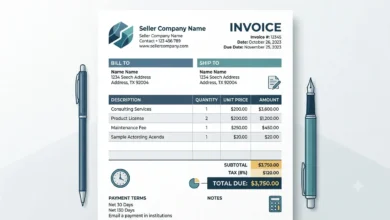
A freelance invoice generator turns your client details, hours or project price, and payment terms into a ready-to-send PDF. No spreadsheet formulas, no formatting from scratch, no guessing what to include.
Late payments are one of the biggest frustrations freelancers deal with, and a big part of that comes down to unclear invoices. This guide covers how to build one correctly, the difference between hourly and fixed-price billing, and the mistakes that slow payment down the most.
Table of Contents
How to Create a Freelance Invoice
Building a freelance invoice comes down to six steps.
Step 1: Add Your Business Information
Include your name or business name, address, email, and phone number. A website link is optional but adds credibility.
Step 2: Add Client Details
Enter your client’s name, company, billing address, and email. Get this right the first time. A wrong company name on an invoice is an easy way to look unprofessional.
Step 3: Describe the Work Clearly
Vague line items slow down payment. Compare these two ways of describing the same work:
| Clear Description | Vague Description |
|---|---|
| Website homepage design | Design work |
| SEO audit for 25 pages | SEO |
| 10 blog articles (1,000 words each) | Writing |
| WordPress maintenance, July | Website work |
A client who understands exactly what they’re paying for is far less likely to ask questions or delay payment.
Step 4: Set Your Rate
Freelancers typically bill one of three ways.
Hourly rate. Works well for consulting, development, or ongoing support. Example: $40/hour × 12 hours = $480.
Fixed price. One agreed amount for a defined project, like a $600 logo design package. Best when the scope is clear upfront.
Monthly retainer. A fixed fee billed on the same date each month, common for SEO, social media management, or ongoing website upkeep.
Step 5: Add Payment Terms
Tell the client exactly when payment is expected. Common terms include Due on Receipt, Net 7, Net 15, and Net 30. Pick whatever matches your agreement with the client.
Step 6: Review and Download
Check the client details, invoice number, rates, and total one more time. Then download the invoice and send it.
You can run through all six steps using our Invoice Generator, which handles the math and formatting automatically.
What Is a Freelance Invoice Generator?
A freelance invoice generator is a tool built for how independent workers bill clients. That might be hourly, by the project, or on a recurring retainer. You fill in your details. It outputs a clean, professional invoice ready to download as a PDF.
If you need the file specifically in PDF format for printing or record-keeping, our PDF Invoice Generator covers that directly.
Why Freelancers Need Professional Invoices
An invoice does more than ask for money. It sets the tone for how seriously a client takes your business.
It builds trust. A clear invoice spells out every detail: services, dates, totals. That signals you run things professionally, not casually.
It gets you paid faster. Clients pay quicker when they don’t have to guess what they owe or how to pay it. Ambiguity is what causes delays, not the amount itself.
It keeps your records straight. Every invoice becomes a record you can pull up later for tax prep, income tracking, or answering a client’s question about a past project.
What a Freelance Invoice Should Include
| Field | Required | Purpose |
|---|---|---|
| Invoice number | Yes | Tracks and separates every invoice |
| Invoice date | Yes | Shows when it was issued |
| Due date | Yes | Sets a clear payment deadline |
| Your information | Yes | Identifies who issued the invoice |
| Client information | Yes | Identifies who owes payment |
| Service description | Yes | Explains the work completed |
| Hours or quantity | Yes | Shows how the total was calculated |
| Rate | Yes | The agreed price per hour or project |
| Taxes | If applicable | Shown separately from the subtotal |
| Total amount | Yes | The final number owed |
| Payment method | Yes | How the client should pay you |
Hourly vs. Fixed-Price Invoices
Which format you use depends entirely on how you priced the work.
| Header Lable | Hourly Invoice | Fixed-Price Invoice |
|---|---|---|
| Charges for | Time spent | One agreed total |
| Best for | Ongoing or open-ended work | Defined, one-time projects |
| Total varies with | Hours worked | Never changes unless scope does |
| Common among | Developers, consultants, VAs | Designers, writers, one-off builds |
An hourly invoice needs a rate and hours worked. A fixed-price invoice just needs the project name and the agreed total. Some invoices mix both, listing hourly line items alongside a flat project fee. That’s fine as long as each line item is clear.
Common Mistakes That Delay Payment
Reusing an invoice number. Every invoice needs its own number. Duplicates make it harder for you and the client to track what’s been paid.
Vague line items. “Design work” tells a client nothing. “Website homepage design” does.
Wrong client details. A misspelled company name or wrong billing address can bounce an invoice back for correction. That alone can add days to the payment timeline.
No payment terms. If a client doesn’t know when payment is due, they’ll often treat it as low priority.
Skipping the final check. Wrong rates, missed hours, or an uncalculated tax line are easy to catch with one more look before you hit download.
Who Uses a Freelance Invoice Generator
Anyone who bills clients independently can use this: writers, designers, developers, consultants, photographers, video editors, virtual assistants, translators, and social media managers. The billing format changes between hourly, fixed, and retainer. The need for a clear, professional invoice stays the same across all of them.
FAQs
What is a freelance invoice?
A freelance invoice is the billing document a freelancer sends a client after finishing a project or milestone. It lists the services provided, the agreed rate, payment terms, and the total amount due.
How do I create a freelance invoice?
Add your business details, your client’s information, a clear description of the work, your rate, and your payment terms. Review everything, then download the finished invoice.
Can I create a freelance invoice for free?
Yes. A free invoice generator, including ours, covers everything a freelancer needs without a paid subscription.
Should I use a different invoice number for every client?
Yes. Each invoice needs its own unique number, even for the same client, so payments stay easy to track.
Can I bill hourly and fixed-price work on the same invoice?
Yes. List each as a separate line item so the client can see exactly how the total was calculated.
When should I send a freelance invoice?
As soon as the work or milestone is finished. Sending it right away, rather than batching invoices later, is one of the simplest ways to get paid faster.
Can I download my freelance invoice as a PDF?
Yes. A PDF keeps the layout consistent no matter what device or software your client opens it with.