Creating barcodes one by one is manageable when you have only a few products. However, the process quickly becomes inefficient when you’re dealing with hundreds or thousands of items.
Many businesses spend hours manually entering product information, assigning serial numbers, and printing labels. This not only slows down operations but also increases the chances of errors, duplicate entries, and inconsistent formatting.
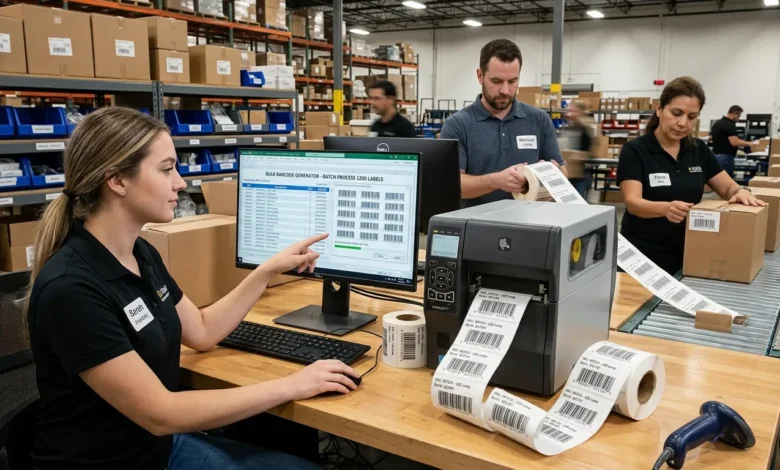
A bulk barcode generator simplifies the entire process by allowing multiple barcodes to be created simultaneously. Instead of generating each barcode individually, users can upload data, automate numbering, and produce large batches of barcodes within minutes.
In this guide, you’ll learn how bulk barcode generation works, which barcode formats are supported, how to avoid common mistakes, and how to streamline the entire workflow.
Table of Contents
What Is a Bulk Barcode Generator?
A bulk barcode generator is a tool designed to create multiple barcodes from a list of values rather than generating them individually.
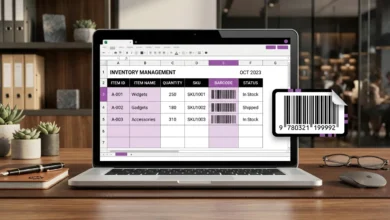
Instead of repeatedly entering information, users can upload an existing spreadsheet, paste a list of values, or automatically generate sequential numbers.
Businesses commonly use these tools to create:
- Product labels
- Inventory tags
- Shipping labels
- Asset identification labels
- Warehouse labels
- Serial numbers
This approach reduces manual work while improving consistency and accuracy.
How Bulk Barcode Generation Works
The process itself is relatively straightforward.
First, the information is collected from a spreadsheet, database, inventory management system, or manually prepared list.
The generator then converts every entry into a machine-readable barcode format.
The finished files can be downloaded, printed, stored, or imported into another system.
A typical workflow looks like this:
- Gather the required information.
- Select a barcode generator format.
- Upload the data.
- Generate the barcodes.
- Verify the output.
- Print the labels.
How to Generate Multiple Barcodes Simultaneously
Creating several barcodes at the same time can save a significant amount of time.
Step 1: Prepare Your Data
Create a spreadsheet containing the information that will appear in each barcode.
Your file might include:
| Product Name | Product ID | Serial Number |
|---|---|---|
| Product A | 1001 | SR-001 |
| Product B | 1002 | SR-002 |
| Product C | 1003 | SR-003 |
Step 2: Choose the Barcode Format
Different situations require different barcode types.
Some of the most widely used formats include:
- Code 128
- EAN
- UPC
- QR Code
- Data Matrix
Step 3: Import Your Data
Most generators support common file formats such as:
- CSV
- XLSX
- TXT
Uploading structured information reduces the risk of manual errors.
Step 4: Generate the Barcodes
The system processes each row of information and converts it into an individual barcode.
This entire process often takes only a few seconds.
Step 5: Verify the Results
Always scan several samples before printing large quantities.
Verification helps ensure the information is accurate and compatible with your equipment.
Also Read: GS1 Barcode Generator Create GS1 Barcodes Online
Batch Barcode Generator vs. Standard Barcode Generator
Many people confuse batch processing with traditional barcode generation.
Although the two methods appear similar, their purposes are very different.
| Feature | Batch Generation | Standard Generation |
|---|---|---|
| Number of barcodes | Multiple | Single |
| Spreadsheet support | Yes | No |
| Automatic numbering | Yes | Limited |
| Processing speed | High | Moderate |
| Bulk printing | Yes | Limited |
If you manage inventory regularly, batch processing is usually the more efficient approach.
How to Import Barcode Data from Excel and CSV Files
One of the biggest advantages of a multiple barcode generator is its ability to work with spreadsheets.
Instead of manually creating every barcode, you can prepare all information beforehand and upload it in a single step.
A properly organized file generally contains the following fields:
- Product identifier
- SKU number
- Batch number
- Category name
- Serial number
- Location code
Before uploading your file, carefully check for:
- Duplicate entries
- Missing values
- Incorrect formatting
- Extra spaces
- Invalid characters
These small errors can cause problems later.
Supported Barcode Formats
Different industries rely on different barcode standards.
Code 128
Code 128 is commonly used for inventory management and logistics operations.
UPC
UPC barcodes are widely used in retail environments.
EAN
EAN barcodes help businesses distribute products internationally.
QR Code
QR codes are frequently used for websites, marketing campaigns, payments, and customer engagement.
Data Matrix
Data Matrix symbols are often used in healthcare, manufacturing, and industrial environments where space is limited.
How to Avoid Duplicate Barcodes
Duplicate records can create serious inventory problems.
Fortunately, most of these issues can be prevented through careful planning.
Use automatic numbering
Automated sequences reduce the risk of human error.
Validate imported data
Check every spreadsheet before generating barcodes.
Assign unique identifiers
Every product should have its own identification number.
Maintain a central database
Keeping all records in one place makes duplication less likely.
Scan samples regularly
Routine testing helps identify problems early.
How to Print Barcodes in Bulk
Printing is just as important as generation.
Even perfectly generated barcodes may fail if they are printed incorrectly.
For the best results:
- Use high-resolution printers.
- Leave sufficient white space around each symbol.
- Maintain strong color contrast.
- Avoid stretching the image.
- Protect labels from damage.
Many businesses also print a small test batch before printing thousands of labels.
Common Barcode Generation Mistakes
A few simple mistakes can create significant problems later.
Selecting the wrong barcode format
Different barcode standards are designed for different purposes.
Using inconsistent data
Inaccurate information produces unreliable results.
Ignoring scanner compatibility
Not every scanner supports every barcode type.
Skipping verification procedures
Testing should always be part of the process.
Printing poor-quality labels
Low-resolution images often result in scanning failures.
Industries That Use Bulk Barcode Generation
Retail
Retail businesses manage large numbers of products every day. Bulk generation improves efficiency and simplifies inventory control.
Warehousing
Warehouses rely on barcode labels to organize inventory and monitor stock movement.
Healthcare
Hospitals and laboratories use barcode systems to improve accuracy and reduce administrative errors.
Manufacturing
Factories use barcode labels throughout production, storage, and shipping operations.
Logistics
Shipping companies depend on barcode technology to monitor packages throughout the supply chain.
Conclusion
Generating large numbers of barcodes manually can slow operations, increase costs, and introduce unnecessary errors.
A reliable bulk barcode generator allows businesses to create, manage, print, and verify thousands of barcodes more efficiently. Whether you work in manufacturing, healthcare, logistics, retail, or warehousing, automation can significantly improve productivity while reducing the risk of mistakes.
By following proper generation, verification, and printing practices, businesses can build a more organized and reliable barcode management system.
FAQs
What is a bulk barcode generator?
A bulk barcode generator creates multiple barcodes simultaneously instead of producing them one at a time.
Can I create barcodes from an Excel spreadsheet?
Yes. Many generators support spreadsheet imports, allowing users to upload existing information directly.
How many barcodes can be generated at once?
The answer depends on the platform being used. Some systems support hundreds of records, while others process thousands.
What is the difference between a batch barcode generator and a mass barcode generator?
Both terms refer to the process of generating numerous barcodes simultaneously rather than individually.
Which barcode format should I choose?
The answer depends on your requirements. Retail businesses often use UPC or EAN codes, while logistics operations frequently rely on Code 128
How can I prevent duplicate barcode creation?
Maintaining unique identifiers, validating imported data, and using automated numbering can significantly reduce the risk of duplication.