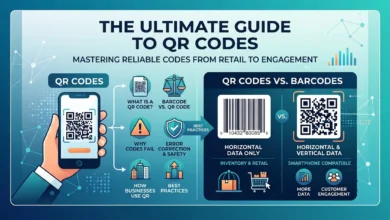
Whether you’re launching a new product, managing inventory, or preparing items for retail distribution, choosing the correct barcode format is essential.
Many businesses create a barcode only to discover that it isn’t compatible with retailers, scanners, or inventory management systems. In most cases, the problem isn’t the barcode itself. The issue usually comes from selecting the wrong format, using an invalid product identifier, or overlooking industry standards.
This guide explains how GS1 barcodes work, how to create them, how GTINs fit into the process, and how to avoid the most common mistakes.
If you need to create a barcode quickly, you can use our GS1 Barcode Generator to generate a properly formatted code within minutes.
Table of Contents
What Is a GS1 Barcode?
A GS1 barcode is a standardized barcode format used to identify products throughout the supply chain. These standards are recognized worldwide and help manufacturers, retailers, warehouses, and logistics companies exchange information accurately.
Unlike ordinary barcodes, GS1 barcodes follow strict formatting rules that ensure compatibility across different systems.
These barcodes are commonly used to store information such as:
- Product identifiers
- Batch numbers
- Serial numbers
- Manufacturing dates
- Expiration dates
- Shipping information
By following international standards, businesses can improve inventory management, increase accuracy, and reduce manual data entry errors.
How to Create a Barcode Using a GS1 Barcode Generator
Creating a barcode is a straightforward process when you follow the correct steps.
Step 1: Choose the Barcode Format
Select the type from our barcode generator that best matches your requirements.
For example:
- UPC
- EAN
- GS1-128
- Data Matrix
Step 2: Enter Your Information
Provide the necessary information, such as:
- Product identifier
- Serial number
- Batch number
- Expiration date
- Product description
Step 3: Generate the Barcode
The tool converts the information into a machine-readable format that can be downloaded and printed.
Step 4: Verify the Barcode
Always test the barcode before large-scale printing.
Scanning the barcode with multiple devices helps ensure that the information is accurate and readable.
How Does a GS1 Barcode Work?
Every barcode contains data that can be read by a scanner. In a GS1 system, that information follows specific rules so that every organization interprets the data in the same way.
The process generally follows these steps:
- Assign a product identifier.
- Select the appropriate barcode format.
- Generate the barcode.
- Print the barcode.
- Scan and verify the information.
Several standards are used within the GS1 framework.
| Standard | Common Use |
|---|---|
| UPC | Retail products |
| EAN | International retail sales |
| GS1-128 | Shipping and logistics |
| DataBar | Fresh products |
| Data Matrix | Product traceability |
GS1 Barcode vs. UPC Barcode
Many people assume that a GS1 barcode and a UPC barcode are identical, but that isn’t entirely correct.
A UPC barcode is one type of barcode that operates within the broader GS1 system.
| Feature | GS1 Barcode | UPC Barcode |
|---|---|---|
| Global standard | Yes | Yes |
| Product identification | Yes | Yes |
| Supply chain support | Yes | Limited |
| Multiple barcode formats | Yes | No |
| Retail compatibility | Excellent | Excellent |
A UPC barcode is generally used for products sold directly to consumers, while other GS1 standards are often used in warehouses, manufacturing environments, healthcare systems, and logistics networks.
Also Read: PDF417 Barcode Generator: How to Create One Plus the AAMVA Format Explained
What Is a GTIN?
GTIN stands for Global Trade Item Number.
This number acts as a unique identifier for a product. Every product variation receives its own identifier to maintain accuracy across inventory systems.
A GTIN helps businesses:
- Identify products quickly.
- Prevent inventory errors.
- Improve supply chain visibility.
- Maintain consistent product information.
- Support retail distribution.
Without a proper identifier, barcode management becomes much more difficult, especially when dealing with large inventories.
GS1 UPC Barcode Generator Explained
Retail businesses frequently rely on UPC barcodes because they are recognized by point-of-sale systems throughout the world.
A GS1 UPC barcode generator simplifies the process by creating standardized UPC barcodes that comply with industry requirements.
Businesses commonly use this format for:
- Grocery products
- Consumer electronics
- Clothing
- Household products
- Beauty products
Proper formatting is essential because even a small mistake can prevent scanners from recognizing the barcode.
Types of GS1 Barcodes
Several barcode formats are available within the GS1 system.
UPC
UPC barcodes are commonly used in retail environments.
EAN
EAN codes support international product identification and distribution.
GS1-128
This format is widely used in shipping and logistics operations.
DataBar
DataBar symbols are often used for food products and fresh produce.
Data Matrix
These compact symbols are frequently used in healthcare, manufacturing, and industrial applications.
Why Your Barcode Isn’t Scanning
Scanning problems are extremely common, especially when labels are printed incorrectly.
Here are some of the most common causes.
Incorrect formatting
Entering the wrong information can create an invalid barcode.
Poor print quality
Blurry images reduce scanning accuracy.
Insufficient white space
Every barcode requires a quiet zone around the edges.
Incompatible scanners
Older devices may not support newer barcode standards.
Incorrect sizing
Extremely small labels often create scanning problems.
How to Verify a Barcode
Verification is one of the most important parts of the process.
Follow these steps:
- Inspect the barcode visually.
- Check the information entered into the generator.
- Test the barcode with multiple scanners.
- Print sample labels.
- Confirm compatibility with existing systems.
Testing helps prevent costly mistakes later.
Common Mistakes to Avoid
Many barcode issues can be prevented with proper preparation.
Avoid these mistakes:
- Using the wrong barcode format.
- Printing labels with low resolution.
- Ignoring barcode dimensions.
- Entering incorrect identifiers.
- Skipping verification tests.
- Using unsupported scanning equipment.
Industries That Use GS1 Barcodes
GS1 standards are used in many industries.
Retail
Stores use barcodes to manage products, pricing, and inventory.
Healthcare
Medical facilities rely on barcodes to improve traceability and patient safety.
Manufacturing
Factories use standardized identifiers to monitor production processes.
Manufacturing facilities also depend on safe and efficient industrial environments where equipment protection and building standards play an important role. Learn more about industrial fireproofing in Spain and how specialized protection systems support modern industrial facilities.
Warehousing
Distribution centers use scanners to improve inventory control.
E-commerce
Online businesses use barcodes to simplify product management.
Conclusion
Choosing the correct barcode format is essential for maintaining accurate inventory records, improving operational efficiency, and supporting long-term business growth.
By understanding how GTINs, UPC codes, and other barcode standards work, businesses can avoid common errors and create barcodes that function reliably across different systems.
Whether you’re managing a small inventory or distributing products worldwide, a properly generated barcode can help streamline your operations and improve accuracy at every stage of the supply chain.
FAQs
What is a GS1 barcode?
A GS1 barcode is a standardized barcode used to identify products and exchange information across supply chains.
How do I create a GS1 barcode?
You can create one by entering product information into a compatible generator, selecting the appropriate format, and verifying the final barcode.
What is the difference between UPC and GS1?
UPC is one barcode type within the GS1 framework.
Can I generate a barcode for free?
Many generators allow users to create and download barcodes without charge.
Why won’t my barcode scan?
Incorrect formatting, poor print quality, and scanner incompatibility are among the most common reasons.