QR codes have become part of everyday life. You can find them on restaurant menus, product packaging, event tickets, payment terminals, shipping labels, and business cards.
Although generating a QR code is simple, creating one that works reliably requires more attention. Many businesses discover that their codes fail because they are too small, printed incorrectly, damaged, or overloaded with information.
This guide explains how QR codes work, why they have become so popular, how they compare with traditional barcodes, and how you can create codes that scan successfully across different devices.
If you want to create one immediately, you can use our QR Code Barcode Generator.
Table of Contents
Why QR Codes Became More Popular Than Traditional Barcodes
Traditional barcodes were originally designed to simplify inventory management and product identification. They remain highly effective in retail stores, warehouses, manufacturing facilities, and logistics operations.
QR codes were developed to solve a different problem.
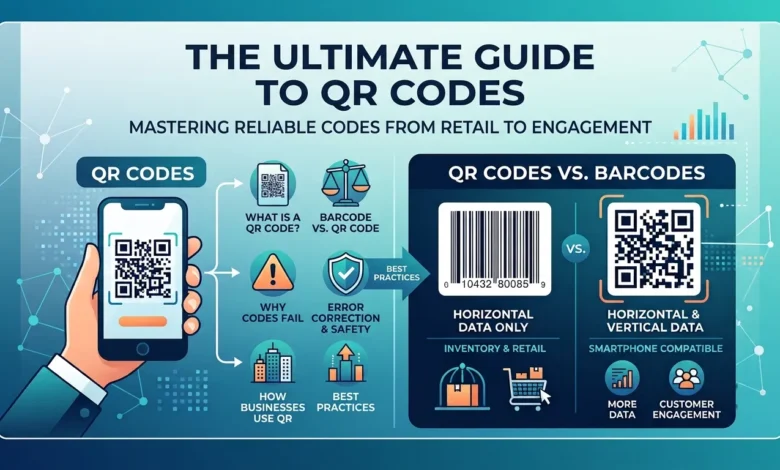
Instead of storing information in a single direction, QR codes store data horizontally and vertically. This allows them to hold considerably more information while occupying a relatively small amount of space.
Another important advantage is compatibility with modern smartphones. Most Android devices and iPhones can scan QR codes directly through their cameras, eliminating the need for specialized equipment.
Today, companies such as Amazon, Walmart, UPS, FedEx, and Shopify merchants use QR technology for customer engagement, tracking systems, product authentication, and payment processing.
What Is a QR Code?
A QR code, or Quick Response code, is a two-dimensional barcode designed to store and retrieve information rapidly.
A single code can contain:
- Website addresses
- Telephone numbers
- Email addresses
- Payment information
- Product details
- Geographic locations
- Wireless network credentials
- Social media links
Unlike traditional barcode systems, QR codes can be scanned from multiple angles, which improves speed and accuracy.
QR Code vs. Barcode
Many people believe QR codes and barcodes are identical technologies. Although they share some similarities, their purposes are very different.
| Feature | QR Code | Traditional Barcode |
|---|---|---|
| Barcode type | Two-dimensional | One-dimensional |
| Storage capacity | High | Moderate |
| Scanning direction | Multiple angles | Horizontal only |
| Error correction | Advanced | Limited |
| Smartphone compatibility | Excellent | Limited |
Traditional barcode formats, including UPC, EAN, and Code 128, are commonly used for inventory tracking and product management.
QR codes are generally more suitable for websites, payments, customer engagement, and marketing campaigns.
Static QR Codes vs. Dynamic QR Codes
Not every QR code functions in the same way.
Understanding the difference between static and dynamic codes can help you select the correct option.
Static QR codes
Static QR codes permanently store information inside the symbol itself.
Once generated, the information cannot be modified.
Businesses commonly use them for contact information, Wi-Fi passwords, product details, and digital business cards.
Dynamic QR codes
Dynamic QR codes offer greater flexibility because the destination information can often be updated later.
Businesses frequently use them for:
- Advertising campaigns
- Customer engagement
- Event management
- Product promotions
- Performance tracking
Also Read: Code 128 Barcode Generator: Create Code 128 Barcodes Online Free
Why Some QR Codes Fail to Scan
Scanning problems are extremely common.
Fortunately, most issues are easy to resolve.
Incorrect size
Very small QR codes can be difficult for cameras to detect.
Poor image quality
Blurry images reduce scanning accuracy.
Low contrast
Dark backgrounds and light patterns often create problems.
Excessive information
Adding too much information increases complexity and reduces readability.
Damaged surfaces
Scratches, folds, dust, and moisture can interfere with scanning.
Poor lighting conditions
Cameras perform best when adequate lighting is available.
Are QR Codes Safe to Use?
Security concerns have increased as QR technology has become more widespread.
The code itself is not dangerous. Problems usually occur when malicious links direct users toward fraudulent websites.
To improve security, businesses should:
- Verify links regularly.
- Monitor unusual activity.
- Use trusted platforms.
- Test codes before publication.
- Avoid suspicious redirects.
Users should always confirm the destination before entering sensitive information.
Error Correction Levels Explained
One reason QR codes have become so popular is their ability to remain functional even after sustaining minor damage.
This capability is possible because of built-in error-correction technology.
| Level | Recovery capability |
|---|---|
| L | Approximately 7% |
| M | Approximately 15% |
| Q | Approximately 25% |
| H | Approximately 30% |
Businesses often choose higher error-correction levels when codes are exposed to demanding environments.
Can Smartphones Scan QR Codes?
Most modern smartphones support QR code scanning.
Android users frequently rely on Google Lens, while iPhone users often scan codes directly through the Camera application.
Several applications also support QR technology, including:
- Google Lens
- Microsoft Lens
- Samsung Camera
- Apple Camera
Even though compatibility has improved significantly, testing a QR code on multiple devices remains a good practice.
How Businesses Use QR Codes
QR technology is now used across numerous industries.
Restaurants
Restaurants use QR codes to provide digital menus, online ordering systems, and payment options.
Retail businesses
Retailers place QR codes on product packaging to share instructions, promotions, warranty information, and support resources.
Healthcare organizations
Hospitals and laboratories use QR technology to improve patient identification and record management.
Transportation companies
Airlines, railway operators, and shipping companies use QR codes for tickets, boarding passes, and package tracking.
Manufacturing facilities
Factories use QR systems to monitor equipment, manage inventory, and track products throughout the supply chain.
How to Create a QR Code
Creating a QR code takes only a few minutes.
First, decide what information you want to share.
Next, enter the information into the generator and create the code.
After downloading the file, test it on several devices to ensure consistent performance.
Finally, print or publish the code only after confirming that it works correctly.
Best Practices Before Printing a QR Code
Proper preparation can significantly improve performance.
Keep the following recommendations in mind:
- Maintain strong contrast between the background and the code.
- Use high-resolution images.
- Leave enough empty space around the code.
- Avoid reflective surfaces.
- Test the code in different environments.
- Verify compatibility with multiple devices.
Small improvements often produce noticeable results.
FAQs
What is a QR code barcode?
A QR code is a two-dimensional barcode that stores information such as text, website addresses, payment information, and contact details.
Are QR codes better than traditional barcodes?
The answer depends on the application. QR codes store more information, while traditional barcodes remain highly effective for inventory management and product identification.
Can Google Lens scan QR codes?
Yes. Google Lens supports QR code scanning on many Android devices.
Can QR codes expire?
Static QR codes usually remain active indefinitely, while dynamic QR codes may depend on the service provider.
Why isn’t my QR code scanning?
Incorrect dimensions, poor image quality, insufficient contrast, damaged surfaces, and low lighting conditions are among the most common causes.
Which industries use QR codes most frequently?
Retail, healthcare, manufacturing, transportation, hospitality, and logistics companies rely heavily on QR technology.