Need to create a Data Matrix barcode but not sure where to start? You’re not alone. Many people generate a code only to discover that it doesn’t scan correctly, prints poorly, or isn’t compatible with the scanner they plan to use.
In most cases, the problem isn’t the barcode itself. It usually comes down to choosing the wrong format, using unsupported data, printing the symbol too small, or testing it with a scanner that doesn’t recognize Data Matrix codes.
This guide explains everything you need to know before creating your first Data Matrix barcode. You’ll learn what a Data Matrix code is, how it works, when it should be used instead of a QR code, and the best practices for creating barcodes that scan reliably.
If you’re ready to generate one, you can use our Data Matrix Barcode Generator to create a barcode in just a few steps.
Table of Contents
What Is a Data Matrix Barcode?
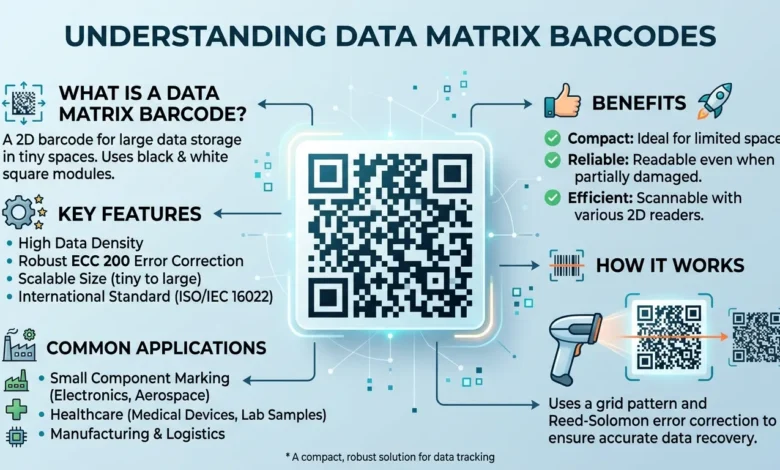
A Data Matrix barcode is a two-dimensional (2D) barcode designed to store a large amount of information in a very small space. Unlike traditional one-dimensional barcodes that contain data in a series of vertical lines, a Data Matrix code stores information in a grid of black and white square modules.
Because of its compact design, it is widely used in industries where available space is limited. Small electronic components, medical devices, laboratory samples, aerospace parts, and manufacturing equipment often use Data Matrix codes for identification and tracking.
One of the biggest advantages of this barcode format is its ability to remain readable even when part of the symbol is damaged. Built-in error correction allows compatible scanners to recover missing data, making it a reliable option for environments where labels may become scratched, dirty, or worn over time.
The international standard for Data Matrix symbols is ISO/IEC 16022, while the most commonly used implementation relies on ECC 200 error correction. Together, these standards ensure consistent encoding and reliable scanning across compatible barcode readers.
Key Features
- Stores a large amount of information in a compact symbol
- Supports letters, numbers, and special characters
- Excellent for marking small products and components
- Includes advanced error correction for improved reliability
- Commonly used in manufacturing, healthcare, logistics, and electronics
- Compatible with many industrial barcode scanners
Because of these capabilities, Data Matrix barcodes have become a standard choice for businesses that need accurate product identification without taking up much label space.
How to Generate a Data Matrix Barcode
Creating a Data Matrix barcode only takes a few minutes when you use the right tool.
Step 1: Open the Generator
Visit our Data Matrix Barcode Generator.
Step 2: Enter Your Data
Type or paste the information you want to encode.
Examples include:
- Product number
- Serial number
- URL
- Asset ID
- Inventory code
- Text
Double-check your information before generating the barcode.
Step 3: Generate the Barcode
Click the Generate button.
The barcode will be created instantly based on your input.
Step 4: Download the Image
Download the generated barcode in your preferred format and save it for printing or digital use.
Step 5: Test Before Using
Before printing hundreds or thousands of labels, scan the barcode with the device that will be used in daily operations.
Testing first helps prevent costly printing mistakes.
Also Read: ISBN Barcode Generator: How to Create One and Which Books Actually Need It
Data Matrix Barcode Specifications
Following basic barcode specifications improves readability and reduces scanning problems.
Symbol Size
Choose a symbol size appropriate for the amount of information being stored.
Adding more characters increases the overall dimensions of the barcode.
Quiet Zone
Always leave sufficient blank space around all four sides of the barcode.
This area helps scanners recognize the symbol correctly.
Print Resolution
Higher print quality produces more reliable scans.
For printed labels, use a printer capable of producing sharp, well-defined edges.
Contrast
Dark modules printed on a light background provide the highest scan success rate.
Avoid decorative colors or patterns behind the barcode.
Image Quality
Do not stretch, crop, or distort the generated barcode after downloading it.
Changing the proportions can affect scanner accuracy.
Data Matrix vs. QR Code
Although both Data Matrix and QR codes are two-dimensional barcodes, they were designed for different purposes. Choosing the right format depends on where the barcode will be used and who needs to scan it.
| Feature | Data Matrix | QR Code |
|---|---|---|
| Best for | Industrial identification | Consumer information |
| Typical use | Manufacturing, healthcare, logistics | Websites, marketing, payments |
| Size efficiency | Excellent | Good |
| Small label printing | Excellent | Moderate |
| Smartphone compatibility | Limited on some devices | Excellent |
| Industrial scanner support | Excellent | Excellent |
A QR code is usually the better option when the goal is to direct users to a website, display contact information, connect to Wi-Fi, or share digital content. Most modern smartphones can scan QR codes directly from the camera application without installing additional software.
A Data Matrix barcode is better suited for industrial environments where products require permanent identification, serial numbers, inventory tracking, or manufacturing data. Its compact size allows more information to fit into a smaller area without sacrificing readability.
When Should You Choose a Data Matrix Barcode?
A Data Matrix barcode is often the better choice when you need to:
- Label small electronic components
- Track medical devices or laboratory samples
- Mark manufacturing parts with serial numbers
- Improve warehouse inventory management
- Identify products throughout the supply chain
For customer-facing applications such as restaurant menus, promotional campaigns, or website links, a QR code is generally the more practical solution because of its broader smartphone support.
Benefits of Using Data Matrix Barcodes
Businesses across many industries rely on Data Matrix barcodes because they combine high data density with dependable scanning performance.
Some of the main benefits include:
Saves Space
A Data Matrix code can hold a significant amount of information while remaining compact. This makes it ideal for products where label space is limited.
Reliable Scanning
Even if part of the symbol becomes damaged, compatible scanners can often recover the stored information through built-in error correction.
Supports Product Traceability
Manufacturers can encode serial numbers, batch information, production dates, and internal tracking identifiers to monitor products throughout their lifecycle.
Works Well for Permanent Marking
Many manufacturers permanently mark metal or plastic parts with Data Matrix symbols using laser engraving or dot peen marking. This helps maintain identification even when labels are removed or damaged.
Improves Inventory Accuracy
Warehouses and distribution centers use Data Matrix codes to reduce manual data entry and improve inventory accuracy during receiving, storage, and shipping.
What Can a Data Matrix Barcode Store?
One of the biggest advantages of a Data Matrix barcode is its ability to store different types of information in a compact symbol. Despite its small size, it can hold enough data for product identification, inventory tracking, manufacturing records, and business operations.
The exact storage capacity depends on the symbol size and the type of data being encoded. Numeric values require less space than alphanumeric characters, allowing more information to fit into the barcode.
A Data Matrix barcode can store:
- Product IDs
- Serial numbers
- Batch or lot numbers
- Manufacturing dates
- Expiration dates
- Website URLs
- Contact information
- Email addresses
- Text messages
- Asset numbers
- Internal tracking codes
- Inventory references
For many businesses, this flexibility makes Data Matrix an excellent choice for tracking products throughout the supply chain.
Common Examples
| Industry | Stored Information |
|---|---|
| Manufacturing | Serial Number, Batch ID |
| Healthcare | Device Identifier, Lot Number |
| Logistics | Shipment Tracking ID |
| Retail | Product Information |
| Electronics | Component Identification |
Unlike traditional linear barcodes, a Data Matrix code can store more detailed information without requiring a larger label.
Why Your Phone Might Not Scan a Data Matrix Barcode
One of the most common questions users ask is:
“Why isn’t my Data Matrix barcode scanning?”
In most cases, the barcode isn’t broken. The issue usually comes from the scanner or the way the barcode was created.
Here are the most common reasons.
Your Camera Doesn’t Support Data Matrix
Most smartphone cameras are designed to recognize QR codes automatically. Data Matrix support varies by device and operating system.
If your camera doesn’t detect the code, try using a barcode scanning application that supports multiple barcode formats.
The Barcode Is Too Small
A Data Matrix barcode is designed for compact labels, but making it extremely small can reduce scan reliability.
When printing labels, always choose a size that your scanner can easily recognize.
Low Print Quality
Blurry printing is another common problem.
Poor printer resolution, faded ink, or low contrast between the barcode and its background can prevent successful scanning.
For the best results:
- Use high-resolution printing.
- Print on a clean white background.
- Maintain strong contrast between black modules and the background.
- Avoid stretching or compressing the barcode image.
Missing Quiet Zone
Every barcode needs empty space around it.
This blank margin, known as the Quiet Zone, helps scanners identify where the symbol begins and ends.
Without enough white space, even a correctly generated barcode may fail to scan.
Unsupported Scanner
Not every barcode scanner reads every barcode type.
Older laser scanners often support only one-dimensional barcodes.
If you’re working with Data Matrix symbols, verify that your scanner supports two-dimensional barcode formats before printing labels in large quantities.
GS1 DataMatrix vs. Regular Data Matrix
Although both barcode types use the same Data Matrix format, they serve different purposes.
A standard Data Matrix barcode can store almost any text or data you choose, making it suitable for internal tracking, inventory management, asset labeling, and manufacturing workflows.
A GS1 DataMatrix follows globally recognized GS1 standards. Instead of storing plain text, it encodes structured business information using predefined identifiers. This format is commonly used in industries where product traceability and regulatory compliance are required.
Standard Data Matrix
A regular Data Matrix barcode is ideal for:
- Internal inventory systems
- Asset management
- Product labels
- Warehouse operations
- Manufacturing workflows
- Equipment identification
It gives businesses complete flexibility because the encoded information can be customized to match internal requirements.
GS1 DataMatrix
A GS1 DataMatrix barcode is designed for standardized product identification.
It commonly includes information such as:
- Global Trade Item Number (GTIN)
- Batch or lot number
- Serial number
- Manufacturing date
- Expiration date
Healthcare, pharmaceuticals, medical devices, and large supply chains frequently rely on GS1 DataMatrix to ensure products can be tracked accurately from production to delivery.
Which One Should You Choose?
Choose a regular Data Matrix if you need a simple barcode for internal business use.
Choose GS1 DataMatrix if your organization must follow GS1 standards or exchange product information across suppliers, distributors, and retailers.
Free Data Matrix Barcode Generator: What to Expect
Many businesses start with a free generator because it provides everything needed for everyday barcode creation.
A quality generator should allow you to:
- Generate unlimited barcodes
- Encode text and numbers
- Download high-quality barcode images
- Print without losing quality
- Create barcodes instantly
For most users, these features are more than enough for inventory labels, equipment tracking, office records, and small business operations.
If your workflow requires compliance with industry standards or advanced barcode customization, additional configuration may be necessary depending on your business requirements.
Best Uses for Data Matrix Barcodes
Data Matrix barcodes are used in industries where accuracy, durability, and compact size are essential.
Manufacturing
Manufacturers use Data Matrix barcodes to identify products throughout production.
Information such as serial numbers and production batches can be scanned within seconds, reducing manual entry and improving traceability.
Healthcare
Hospitals and medical equipment manufacturers use Data Matrix codes for tracking medical devices, laboratory samples, and surgical instruments.
Reliable identification helps reduce errors and improves patient safety.
Electronics
Electronic components often have very limited space for labeling.
Because Data Matrix codes remain readable even at small sizes, they are commonly applied to circuit boards, chips, and electronic assemblies.
Logistics and Warehousing
Warehouses rely on Data Matrix labels for:
- Inventory control
- Package identification
- Shipment tracking
- Asset management
Fast scanning speeds help improve operational efficiency and reduce processing errors.
Aerospace and Automotive
Industries that require permanent part identification frequently mark components directly with Data Matrix symbols.
This allows every component to be traced throughout its service life.
Best Practices for Printing Data Matrix Barcodes
Generating a barcode is only the first step. Printing it correctly is equally important.
Use High Contrast
Black symbols on a white background generally produce the most reliable scan results.
Avoid low-contrast colors that make the modules difficult to distinguish.
Print at the Correct Size
Although Data Matrix codes work well in small spaces, making them excessively small may reduce readability.
Choose a size appropriate for both the amount of encoded data and the scanner being used.
Leave a Quiet Zone
Always leave sufficient blank space around every side of the barcode.
Without this margin, scanners may struggle to detect the symbol accurately.
Test Before Mass Printing
Before printing hundreds or thousands of labels, print one sample and verify that it scans correctly.
Testing early helps avoid wasted labels, ink, and production delays.
Protect the Barcode
If the barcode will be exposed to moisture, heat, chemicals, or frequent handling, use durable labels and high-quality printing materials to preserve readability over time.
How to Test Your Data Matrix Barcode
Testing should always be part of your workflow before deploying a barcode.
After generating the barcode:
- Scan it using the device that will be used in daily operations.
- Confirm that all encoded information is displayed correctly.
- Print a sample label and scan it again.
- Test under normal working conditions, including lighting and scanning distance.
- If multiple scanners are used, verify compatibility across each device.
A barcode that scans successfully during testing is far less likely to cause problems later.
Common Mistakes to Avoid
Many scanning problems can be prevented by avoiding a few common mistakes.
- Encoding incorrect information
- Printing the barcode too small
- Using poor image quality
- Removing the quiet zone
- Printing with low contrast
- Failing to test before production
- Assuming every scanner supports Data Matrix
- Stretching or resizing the barcode after generation
Paying attention to these details helps ensure reliable performance throughout the barcode’s lifecycle.
Conclusion
Data Matrix barcodes offer a practical solution for storing large amounts of information in a compact and reliable format. Their ability to fit on small labels, support error correction, and perform well in demanding environments makes them a preferred choice across manufacturing, healthcare, logistics, electronics, and many other industries.
Whether you’re labeling products, tracking inventory, or managing business assets, creating a properly formatted barcode is essential for accurate scanning and long-term reliability. Following best practices such as maintaining adequate print quality, leaving a proper quiet zone, and testing your barcode before deployment can help prevent common scanning issues.
If you’re ready to create your own barcode, use our Data Matrix Barcode Generator to generate a clean, high-quality Data Matrix code in just a few simple steps.
FAQs
What is a Data Matrix barcode used for?
A Data Matrix barcode is used to store information in a compact, machine-readable format. Businesses commonly use it for product identification, inventory management, asset tracking, manufacturing, logistics, healthcare, and electronics. Its small size and reliable scanning make it ideal for labeling products with limited space.
Can a QR scanner read a Data Matrix barcode?
It depends on the scanner. Many industrial barcode scanners support both QR codes and Data Matrix barcodes. However, some mobile camera applications are designed primarily for QR codes and may not recognize Data Matrix symbols without a compatible scanning app.
What is a 2D Data Matrix barcode generator?
A 2D Data Matrix barcode generator is an online tool that converts text, numbers, URLs, serial numbers, or other information into a Data Matrix barcode. After entering your data, the tool creates a barcode that can be downloaded and printed for business or industrial use.
Is GS1 DataMatrix different from a regular Data Matrix code?
Yes. A regular Data Matrix barcode can store almost any information you choose, making it suitable for internal business use.
A GS1 DataMatrix follows GS1 standards and uses structured identifiers for product tracking, supply chain management, and regulatory compliance.
How much data can a Data Matrix barcode hold?
The storage capacity depends on the symbol size and the type of data being encoded. Larger symbols can store significantly more information than smaller ones, including numbers, letters, and special characters. For most business applications, a Data Matrix barcode provides more than enough capacity for product identification and tracking.
Can a Data Matrix barcode contain a website URL?
Yes. A Data Matrix barcode can store a website address, allowing compatible scanners to open the webpage after scanning. While this is possible, QR codes are generally more common for public-facing web links because they are supported by most smartphone cameras.
Can smartphones scan Data Matrix barcodes?
Some smartphones can scan Data Matrix barcodes, while others require a dedicated barcode scanning application. Support varies depending on the device, operating system, and camera software.
Does a Data Matrix barcode expire?
No. A Data Matrix barcode does not expire on its own. As long as the printed symbol remains undamaged and the encoded information is still valid, it can continue to be scanned successfully.