Code 128 is one of the most widely used barcode formats in the world. Warehouses, retailers, manufacturers, healthcare providers, and logistics companies rely on it every day to track products, monitor shipments, and manage inventory.
Many people create a barcode only to discover that it will not scan correctly. In most cases, the problem is not the barcode itself. The issue is usually related to incorrect dimensions, poor printing quality, incompatible scanners, or an incorrect character set.
This guide explains how Code 128 works, how to create a barcode correctly, how scanners interpret encoded information, and how to avoid the most common mistakes.
If you want to create a barcode immediately, you can use our Code 128 Barcode Generator.
Table of Contents
What Is a Code 128 Barcode?
Code 128 is a high-density, one-dimensional barcode format capable of storing numbers, letters, symbols, and control characters. Because of its flexibility and compact size, it has become one of the most widely used barcode standards in the world.
Unlike older barcode formats, Code 128 supports the complete ASCII character set, allowing organizations to store a much larger amount of information within a relatively small space.
Businesses frequently use this format to manage inventory, track shipments, identify assets, organize warehouse locations, and simplify manufacturing operations.
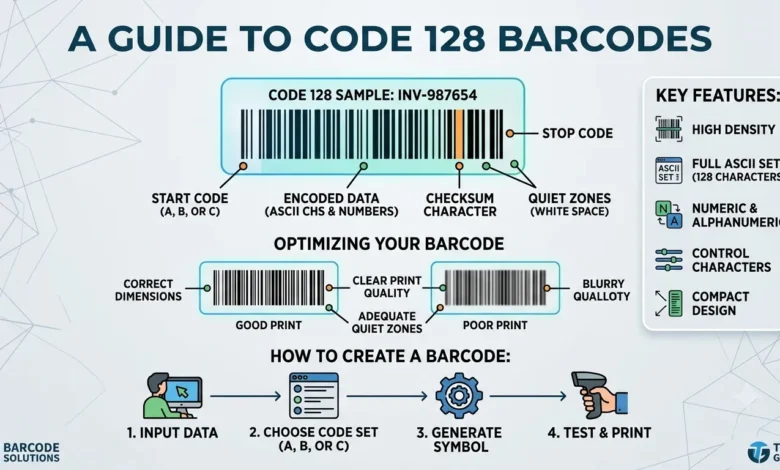
How to Create a Code 128 Barcode
Creating a barcode is a straightforward process.
Step 1: Enter your information
Provide the information to barcode generator you want to encode.
This may include product numbers, serial numbers, shipment references, or inventory identifiers.
Step 2: Select the character set
Choose the character set that best fits your requirements.
Step 3: Generate the barcode
The system converts the information into machine-readable symbols.
Step 4: Download the barcode
Save the file in the desired format.
Step 5: Verify the barcode
Test the barcode with different scanners before printing large quantities.
Key Features of Code 128
| Feature | Description |
|---|---|
| Barcode type | One-dimensional (1D) |
| Character support | Full ASCII support |
| Error detection | Check digit |
| Scanner compatibility | Excellent |
| Common uses | Inventory management and logistics |
Also Read: Bulk Barcode Generator Create Multiple Barcodes at Once
How Does Code 128 Work?
A barcode scanner reads patterns of bars and spaces and converts them into readable information.
Every Code 128 barcode consists of several important elements:
- Start code
- Encoded data
- Check digit
- Stop code
- Quiet zone
The check digit helps scanners verify the accuracy of the information, reducing the likelihood of errors during the scanning process.
This additional layer of validation makes Code 128 particularly reliable for industrial applications.
Code Set A vs. Code Set B vs. Code Set C
One of the biggest advantages of Code 128 is the availability of multiple character sets.
Code Set A
Code Set A supports uppercase letters, numbers, control characters, and special symbols. It is commonly used in industrial and manufacturing environments.
Code Set B
Code Set B supports uppercase letters, lowercase letters, numbers, and punctuation marks. Most businesses rely on this configuration because of its flexibility.
Code Set C
Code Set C focuses primarily on numerical information. It stores pairs of numbers together, allowing larger amounts of data to fit into a smaller area.
This configuration is widely used in logistics and warehousing operations.
What Information Can a Code 128 Barcode Store?
One reason businesses prefer this format is its ability to store a wide variety of information.
Code 128 symbols can contain:
- Product identifiers
- Serial numbers
- Tracking numbers
- SKU numbers
- Shipping references
- Asset identifiers
- Inventory data
- Location codes
Large organizations such as Amazon, UPS, FedEx, Walmart, and Shopify sellers frequently depend on this barcode format because of its reliability and efficiency.
The amount of information that can be stored depends on barcode size, printing quality, and the selected character set.
Code 128 vs. Code 39
Code 128 and Code 39 are often compared because both are widely used in business environments.
| Feature | Code 128 | Code 39 |
|---|---|---|
| Storage capacity | High | Moderate |
| Space efficiency | Excellent | Moderate |
| Character support | Extensive | Limited |
| Error detection | Included | Limited |
| Industrial applications | Extensive | Common |
Organizations that need better storage capacity and improved efficiency generally prefer Code 128.
Code 128 vs. QR Code
Although both technologies store information electronically, they are designed for different purposes.
| Feature | Code 128 | QR Code |
|---|---|---|
| Barcode type | One-dimensional | Two-dimensional |
| Shape | Horizontal | Square |
| Storage capacity | Moderate | High |
| Scanner compatibility | Excellent | Excellent |
| Smartphone compatibility | Limited | Excellent |
| Inventory management | Excellent | Good |
Code 128 is often used in warehouses, while QR codes are more commonly used for websites, digital payments, menus, and marketing campaigns.
GS1-128 vs. Code 128
Many users believe that these two standards are identical. In reality, GS1-128 is built on top of the Code 128 standard.
| Feature | Code 128 | GS1-128 |
|---|---|---|
| Global standardization | Limited | Extensive |
| Application identifiers | No | Yes |
| Supply chain support | Good | Excellent |
| Product traceability | Good | Excellent |
GS1-128 is frequently used in shipping operations, healthcare organizations, manufacturing facilities, and global supply chains.
Can Smartphones Scan Code 128 Barcodes?
Many smartphones can scan QR codes directly through the camera application, but Code 128 support often requires dedicated software.
Android devices generally support third-party barcode applications that recognize Code 128 symbols. Some iPhone applications provide similar functionality.
Industrial barcode scanners remain the most reliable option because they are specifically designed for these environments.
Whenever possible, test the barcode using multiple devices.
Why Your Barcode Is Not Scanning
Barcode scanning problems usually have simple solutions.
Incorrect character selection
Choosing the wrong character set can lead to scanning errors.
Poor print quality
Low-resolution printing may reduce readability.
Missing quiet zones
Every barcode requires a clear area around its edges.
Damaged labels
Dust, scratches, and folds can affect scanning accuracy.
Scanner incompatibility
Some older scanners may not support every barcode format.
Barcode Dimensions and Quiet Zones
Barcode size plays a major role in overall performance.
If a barcode is too small, scanners may have difficulty identifying the bars and spaces correctly.
Several factors influence barcode size:
- Printing resolution
- Scanner quality
- Data length
- Viewing distance
- Label dimensions
Maintaining proper spacing around the barcode significantly improves scanning reliability.
Printing Best Practices
Following established printing standards helps improve performance.
- Use high-resolution printers.
- Maintain strong contrast.
- Avoid stretching the barcode image.
- Keep labels clean and undamaged.
- Test sample prints before large production runs.
These simple steps can prevent costly errors later.
Industries That Use Code 128
Retail
Retailers use barcode technology to organize products, manage inventory, and simplify daily operations.
Warehousing
Warehouses process thousands of products every day. Code 128 helps organizations monitor inventory movement, track shipments, and organize storage locations efficiently.
Logistics
Companies such as UPS, FedEx, and USPS use barcode systems to monitor packages throughout the shipping process.
Healthcare
Hospitals and laboratories use barcode technology to reduce errors and improve identification accuracy.
Manufacturing
Manufacturers rely on barcode systems to monitor production, manage equipment, and track products throughout the supply chain.
Common Mistakes to Avoid
Many barcode problems can be prevented with proper planning.
Avoid these common mistakes:
- Selecting the wrong barcode format
- Ignoring character-set requirements
- Using incorrect dimensions
- Printing poor-quality labels
- Skipping verification procedures
- Using incompatible scanners
Conclusion
Code 128 remains one of the most efficient barcode formats available because of its flexibility, reliability, and compatibility with numerous systems and industries.
Whether you manage a warehouse, operate an online store, handle shipments, or track assets, understanding how Code 128 works will help you create more reliable and accurate barcode systems.
By following proper generation, printing, and verification practices, you can avoid common problems and improve scanning performance significantly.
FAQs
What is a Code 128 barcode?
A Code 128 barcode is a high-density linear barcode used to store numbers, letters, symbols, and control characters.
Can smartphones scan Code 128 barcodes?
Yes, but many devices require dedicated barcode-scanning applications.
What is the difference between Code 128 and Code 39?
Code 128 stores more information, supports more characters, and provides greater efficiency.
What is a check digit?
A check digit helps scanners verify the accuracy of encoded information.
Can I use Code 128 for inventory management?
Yes. Warehouses, manufacturers, and retailers frequently use this barcode format to organize products and monitor inventory.
Why isn’t my barcode scanning?
Poor print quality, incorrect sizing, damaged labels, and incompatible scanners are among the most common causes.